Using AI Alongside Your UI Tests, Not Instead of Them

Most engineering teams rely on mature, powerful tools like Playwright, Cypress, and Selenium to automate UI flows. These frameworks are stable, flexible, and deeply integrated into modern dev pipelines.
Yet… UI testing still feels slow, flaky, and frustrating.
So the question many teams quietly ask is: “Can AI make UI testing easier?”
Yes, but only as an augmentation layer, not a replacement.
This article breaks down how AI fits into UI testing today, what it realistically solves, what it absolutely cannot replace, and how a hybrid model (framework + AI) enables teams to deliver faster, more reliable test cycles without disrupting existing workflows.
Why UI Automation Still Feels Hard (Even With Great Tools)
None of us struggles because Playwright or Cypress is “bad.” These tools are more capable than ever. We struggle because automation takes time, and maintenance never ends.
This Reddit post down below perfectly sums up the problem engineers face while testing using manual tools:
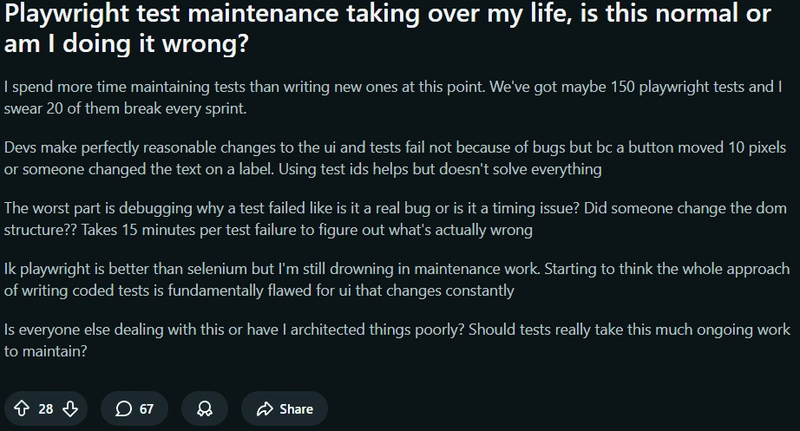
Common pain points:
- Rewriting broken selectors every sprint
- Creating repetitive assertions
- Debugging flaky tests
- Maintaining hundreds of UI tests as the product changes
What AI Can Realistically Do in UI Testing Today
AI won’t replace your test suite, but it excels in repetitive, low-level, slow tasks that drain your time.
- Generate UI test drafts from a URL or screen: No more starting test files from scratch.
- Select stable, intelligent locators: AI can analyze the DOM and identify attributes that are less likely to break.
- Auto-fix broken selectors when UI changes: A massive time-saver after redesigns or CSS shifts.
- Suggest missing edge cases: AI identifies which parts of the UI are not covered.
What AI cannot replace reliably today
- Business logic: AI doesn’t understand your refunds, pricing rules, compliance rules, or feature flags.
- Test environment setup: Network mocking, data seeding; environments are still framework-controlled.
- Human judgment: Determining whether something constitutes “expected behavior” involves interpretation.
- Your entire testing stack: Replacing Playwright or Cypress with an AI black box is risky and unrealistic.
AI + Your Framework: The Hybrid Future of UI Testing
The only method that works combines AI with your existing framework. You continue writing tests usually, but AI handles:
- First-draft generation
- Fixing broken selectors
- Cleaning up flaky tests
- Writing assertions
- Boosting coverage
- Maintaining test stability
This lets teams ship faster without rewriting their test architecture.
Practical Scenarios Where AI Helps Immediately
This is where teams feel the ROI most.:
- New features need tests fast: AI produces initial test coverage instantly.
- UI redesign breaks 40% of tests: AI automatically repairs selectors.
- A backlog of missing tests: AI fills gaps so QA starts from something real.
- Hard-to-debug flakiness: AI identifies brittle selectors and unstable DOM elements.
- Messy assertion blocks: AI rewrites them into clean, accurate, stable assertions.
Where KushoAI Fits Into This Hybrid Workflow
Unlike other AI tools that promise to replace testing, KushoAI augments your existing workflow.
-
KushoAI can record fundamental user interactions in a browser, then auto-generate full UI test scripts, saving the effort of writing tests from scratch.
-
You can edit or extend the generated tests, modify selectors, assertions, or test logic as needed, providing flexibility to adapt to design changes or new edge cases.
-
Because KushoAI integrates both API + UI testing under one roof, you can combine them to build end-to-end tests that cover complete fintech user journeys (e.g., login → payment → confirmation UI + backend API).
To know more about the UI testing with KushoAI, check out our UI Testing video:
Conclusion:
People create logic, frameworks run tasks consistently, and AI handles the repetitive tasks. This combination should become the standard practice.
The testing world doesn’t need a new framework. It needs a way to reduce the painful, repetitive parts of UI testing. With KushoAI, you can do that.