TWD Tip: Stub Auth0 Hooks and Mock React Modules

Authentication is one of the trickiest features to test in modern apps.
Tools like Auth0 help a lot, especially with React, providing hooks like useAuth0 to manage authentication.
However, automating these tests is tricky.
- With Cypress, testing across domains requires special configuration.
- With Vitest, you need to mock data, but your tests still only return a simple pass/fail in the terminal.
- You also need real users created and validated
TWD (Testing While Developing) takes a different approach: it encourages testing behavior, not infrastructure. That means you don’t need to test the auth provider itself — you just need to simulate the authentication behavior your app depends on.
For React apps using Auth0 with PKCE flow, it’s a bit more complicated, because we rely on the hook rather than simple requests. Let’s see how we can fully control authentication in our tests.
Tool for spying and mocking
We’ll use Sinon, a classic library for spies, stubs, and mocks. Why Sinon? Because it works directly in the browser — which is essential for TWD.
Understand the Auth0 hook
Here’s the basic usage in a React component:
import { useAuth0 } from "@auth0/auth0-react";

// get info of user in the app
const { user, getAccessTokenSilently, loginWithRedirect, logout } = useAuth0();
These methods allow your app to:
- Log in and log out users
- Get user info
- Get tokens to send to your API
Move auth logic to a separate file
To stub the hook in TWD tests, we create a small wrapper:
import { useAuth0 } from "@auth0/auth0-react";

const useAuth = () => useAuth0();

export default { useAuth };
Important: we export as default and as an object.
Why? Because ESModules are immutable by default. Named exports like export const useAuth = ... cannot be mocked at runtime, but an object property can. This small tradeoff gives us complete control during tests.
Stub the hook in your tests
Now, in your TWD test, you can use Sinon to control authentication behavior:
import { beforeEach, describe, it, afterEach } from 'twd-js/runner';
import { twd, screenDom, userEvent, expect } from 'twd-js';
import authSession from '../hooks/useAuth';
import Sinon from 'sinon';
import userMock from './userMock.json';
import type { Auth0ContextInterface } from '@auth0/auth0-react';

describe('App tests', () => {
  beforeEach(() => {
    Sinon.resetHistory();
    Sinon.restore();
    twd.clearRequestMockRules();
  });

  afterEach(() => {
    twd.clearRequestMockRules();
  });

  it('should render home page for authenticated user', async () => {
    Sinon.stub(authSession, 'useAuth').returns({
      isAuthenticated: true,
      isLoading: false,
      user: userMock,
      getAccessTokenSilently: Sinon.stub().resolves('fake-token'),
      loginWithRedirect: Sinon.stub().resolves(),
      logout: Sinon.stub().resolves(),
    } as unknown as Auth0ContextInterface);

    await twd.visit('/');
    const welcomeText = await screenDom.findByRole('heading', { name: 'Authenticated area', level: 1 });
    twd.should(welcomeText, 'be.visible');
    const infoText = await screenDom.findByText('You are signed in with Auth0. Manage your profile and jot down quick notes below.');
    twd.should(infoText, 'be.visible');
  });
});
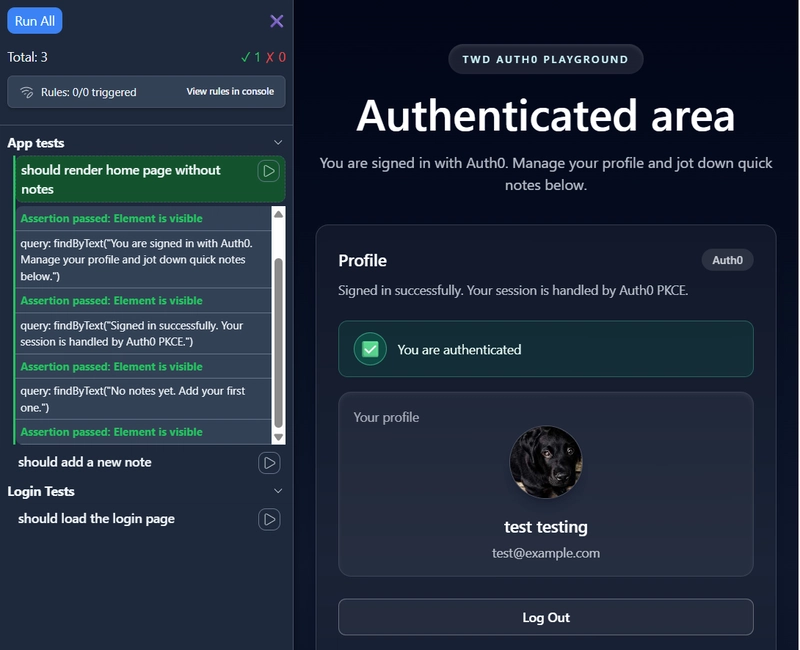
With this setup, you can test any scenario:
- User is logged in or logged out
- User has different roles or data
- Authentication errors
Conclusion
Exporting hooks as mutable objects and stubbing them with Sinon lets you run browser tests in TWD with full control over authentication behavior. This allows you to focus on testing your app’s behavior, without worrying about the complexities of the auth provider itself.
- Full example React app with this flow: twd-auth0-pkce
- Auth flow with backend sessions example: twd-auth0
- Official TWD documentation: twd.dev
This approach isn’t just for Auth0 — it works for any module you need to control in TWD browser tests.