Inter-Region Connectivity in AWS using CloudWAN

AWS Cloud WAN is a managed wide-area networking (WAN) service from Amazon Web Services. It lets you build, manage, and monitor a unified global network that spans both cloud and on-premises environments. In practice, Cloud WAN lets you connect your data centres, branch offices, remote sites, and AWS cloud resources (e.g. VPCs) through a central control plane — instead of manually wiring together many VPCs, VPNs, Transit Gateways, and third-party SD-WANs.
Key Concepts & How It Works
Global Network
This is the top-level container — it can hold a core network and any associated attachments (VPCs, VPNs, etc.).
Core Network
The core network is the portion of your Cloud WAN that is managed by AWS — essentially the backbone/fabric that ties your network attachments (VPCs, VPNs, Transit Gateways, on-prem links etc.) together.
Core Network Edge
A Core Network Edge is a regional connection point provisioned and managed by AWS in each AWS Region that you include in your core network via your core-network policy. Under the hood, a CNE is similar to AWS Transit Gateway (TGW) — meaning it acts like a regional router that aggregates and routes traffic — but differs in that it is fully managed by AWS.
Core Network Policy
A policy document (in a declarative language) that states how your network should be configured:
- which AWS Regions to include
- how attachments map to segments
- routing rules
- traffic-isolation rules
Cloud WAN then implements the network configuration automatically.
Attachments
These are the resources you hook into your network — like VPCs, VPN connections, Transit Gateways, SD-WAN links, on-premises branch office links.
Network segmentation
Cloud WAN lets you define segments — isolated routing domains. So you can isolate e.g. production, development, branch offices, or sensitive resources even if they share the same overall network backbone.
Central dashboard & automation
You manage everything — global scope, attachments, routing — from a single dashboard (via AWS Network Manager) or using AWS CLI / APIs. Cloud WAN automates the heavy lifting so you don’t manually configure every link.
Let’s get started
Create the Global Network namespace
- Name your Global Network. (AWS > Network Manager > Global network)
- Add core network. Can have a max of 1 core network.
- Set ASN setting. Set the range. (The value must be a range between 64512-65534 or 4200000000-4294967294.) This is used by AWS for managing traffic between VPCs.
- Choose edge locations -> us-east-1, us-west-2…
- Set default segment name. This will be available in all edge locations.
Once you create it, the default policy will be created.
{
    "version": "2021.12",
    "core-network-configuration": {
        "asn-ranges": [
            "64520-64524"
        ],
        "edge-locations": [
            { "location": "us-east-1" },
            { "location": "us-west-2" }
        ]
    },
    "segments": [
        {
            "name": "production",
            "description": "production environment"
        }
    ]
}
You can create additional segments and configure attachment policies.
Network Design
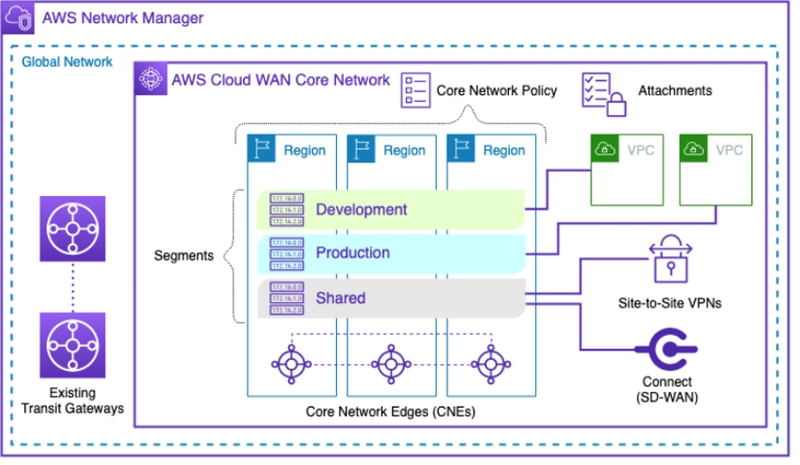 [src: https://docs.aws.amazon.com/whitepapers/latest/aws-vpc-connectivity-options/aws-cloud-wan.html]
In this diagram, there are multiple regions and multiple segments – Development, Shared and Production. Each region is connected using the CNEs. The segments have network connectivity defined by the core network policy.
Based on the diagram, I have created a sample network policy.
{
  "core-network-configuration": {
    "vpn-ecmp-support": true,
    "asn-ranges": [
      "64520-64524"
    ],
    "edge-locations": [
      {
        "location": "us-east-1",
        "asn": 64520
      },
      {
        "location": "us-west-2",
        "asn": 64521
      }
    ]
  },
  "version": "2021.12",
  "attachment-policies": [
    {
      "rule-number": 100,
      "action": {
        "association-method": "tag",
        "tag-value-of-key": "SEGMENT"
      },
      "conditions": [
        {
          "type": "tag-exists",
          "key": "SEGMENT"
        }
      ]
    }
  ],
  "segments": [
    {
      "name": "SHARED",
      "require-attachment-acceptance": false,
      "edge-locations": [
        "us-east-1",
        "us-west-2"
      ]
    },
    {
      "name": "DEVELOPMENT",
      "require-attachment-acceptance": false,
      "edge-locations": [
        "us-east-1",
        "us-west-2"
      ],
      "deny-filter": [
        "PRODUCTION"
      ]
    },
    {
      "name": "PRODUCTION",
      "require-attachment-acceptance": true,
      "edge-locations": [
        "us-east-1",
        "us-west-2"
      ]
    }
  ],
  "segment-actions": [
    {
      "mode": "attachment-route",
      "segment": "SHARED",
      "action": "share",
      "share-with": [
        "DEVELOPMENT",
        "PRODUCTION"
      ]
    },
    {
      "mode": "attachment-route",
      "segment": "PRODUCTION",
      "action": "share",
      "share-with": [
        "DEVELOPMENT"
      ]
    }
  ]
}
Understanding the Policy
asn-ranges: You define the asn-ranges where you will later pick the asn for a region.
edge-location: Here you define the edge locations your network will work in.
attachment-policies: This defines the policy for attaching the segments. Here. I am attaching the attachments to the segments based on the tag automatically. The tag key is set to be SEGMENT.
segments: This is a list of segments with edge-location. Note, the DEVELOPMENT segment rule, there is a deny-filter policy to PRODUCTION which makes the traffic uni-directional.
segment-actions: By default, the sharing is bi-directional. That is, for SHARED segment, it is shared with DEVELOPMENT and PRODUCTION. You don’t need to share DEVELOPMENT and PRODUCTION with SHARED as it is bi-directional.