
Improve Site Performance by Auditing Unused Code

Overview
Shipping unused CSS and JavaScript does more than clutter your codebase. It directly affects your site’s performance. Every unused rule or function is extra data the browser has to download and parse before the page becomes interactive. While you could manually compare your styles against your HTML, modern browsers provide a more easier solution: the Coverage tool.
What the Coverage tool does
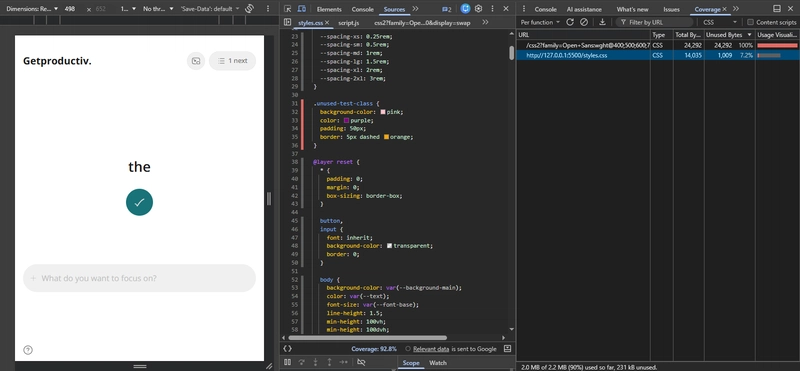
The Coverage panel in developer tools analyzes every CSS and JavaScript resource loaded on a page. It calculates which parts of each file are actually used during rendering and highlights the unused sections. This gives you a clear view of what can be safely removed.
How it works
- Open DevTools (
Cmd+Option+Ion Mac orCtrl+Shift+Ion Windows). - Open the Command Menu (
Cmd+Shift+PorCtrl+Shift+P). - Type Coverage and select Show Coverage.
- In the Coverage tab, click the reload icon to start recording.
The panel lists all CSS and JavaScript files, along with the percentage of code executed. Red highlights indicate unused sections. You can also filter the results to show all resources or only CSS or only JavaScript.
Analyzing Results
Once the page reloads, the Coverage tab displays the used and unused portions of each file. These results are helpful but require proper interpretation.
- Pseudo classes such as hover or active appear unused when they are not triggered.
- Media query rules appear unused if your current viewport does not match the query.
- Interaction based styles and animations will not register unless activated during recording.
- JavaScript that runs only after specific actions will appear unused until those actions occur.
Conclusion
Performance improvements do not always require complex changes. Identifying and removing unused CSS and JavaScript is a simple and effective way to reduce page weight. The Coverage tool helps you find what is no longer used on the page, and removing that results in a faster site.
