
How to Design a Notification System: A Complete Guide

This guide outlines how to build a scalable notification service supporting email, SMS, push and in-app channels. It covers user preferences, rate-limiting, synchronous & batch delivery, queueing with retries, high availability, and trade-offs between latency, cost and reliability.
design a notification system
Think about the apps you use every day. A banking app alerts you about suspicious activity. A shopping app lets you know when your order ships. A chat app pings you when a friend sends a message. All of these rely on a notification system working seamlessly behind the scenes.
On the surface, notifications feel simple—you receive a message or alert, and that’s it. But under the hood, they’re surprisingly complex. Delivering millions of notifications across email, SMS, push, and in-app channels requires careful planning, robust infrastructure, and a design that can scale.
That’s why learning how to design a notification system is so important. It’s not just a valuable System Design interview question—it’s a real-world problem faced by companies building apps at scale. Understanding the design decisions involved will make you a stronger engineer and prepare you to tackle one of the most common challenges in distributed systems.
In this guide, you’ll walk through the full journey: defining requirements, exploring challenges, outlining the architecture, and thinking about scaling, reliability, and security. By the end, you’ll know not just how to design a notification system, but how to explain the trade-offs behind your decisions in both interviews and real projects.
Defining the Problem: What Does a Notification System Do?
Before diving into architecture for a System Design interview, it’s important to step back and define what we’re trying to build. At its core, a notification system is responsible for delivering timely information to users through multiple channels.
Channels a Notification System Supports
- Push notifications: Mobile and desktop alerts via services like FCM (Firebase Cloud Messaging) or APNs (Apple Push Notification Service). ([Firebase][1])
- Email notifications: Transactional emails like password resets, receipts, or promotions. ([SendGrid][2])
- SMS notifications: Time-sensitive alerts like OTPs or delivery updates. ([Twilio][3])
- In-app notifications: Alerts that appear inside the app itself, often using real-time connections like WebSockets.
The Role of Notifications
- User engagement: Encouraging users to return to your app.
- Transaction updates: Confirming actions like payments, orders, or deliveries.
- Security alerts: Warning users about logins, password changes, or suspicious activity.
- System communication: Keeping users informed about downtime, maintenance, or feature changes.
When you’re asked to design a notification system, it’s not just about sending messages—it’s about building a service that handles scale, personalization, and reliability across all these channels.
Requirements for Designing a Notification System
Functional Requirements
- Multi-channel support: Push, SMS, email, and in-app alerts.
- Guaranteed delivery: Ensure messages are sent reliably.
- User preferences: Respect quiet hours, preferred channels, and opt-outs.
- Personalization: Customize notifications to user context (e.g., “Hi John, your package is on the way”).
- Retry mechanism: Resend messages if a delivery attempt fails.
Non-Functional Requirements
- Scalability: Handle millions of notifications per minute during peak times.
- Low latency: Deliver time-sensitive notifications (like OTPs) in seconds.
- High availability: Keep the system running even during failures.
- Fault tolerance: Recover from service crashes or network issues without data loss.
- Observability: Track notification delivery, failures, and retries with monitoring and logs.
When designing a notification system in an interview, start by clarifying these requirements. This demonstrates structured thinking, sets the stage for your architectural decisions, and is good System Design interview practice.
Core Challenges in Notification Systems
Key Challenges
- High Concurrency: Millions of notifications may need to be delivered in a very short time.
- Multi-Channel Complexity: Each channel has its own quirks and failure modes.
- Delivery Guarantees: Deciding between at-most-once, at-least-once, or exactly-once semantics.
- User Preferences: Enforcing opt-in/out, quiet hours, per-channel preferences at scale.
- Failure Handling: External dependencies fail — need retries, backoffs, dead-lettering, and fallbacks.
These challenges shape the architecture. A successful design of a notification system solution isn’t just about sending messages—it’s about building resilience, respecting preferences, and scaling gracefully.
High-Level Architecture of a Notification System
At a high level, a notification system looks like a pipeline: an event is generated, processed, and delivered through the right channel.
Core Components
- Producer (Event Source) — Generates notification events.
- Queue or Message Broker — Acts as a buffer between producers and notification workers (Kafka, RabbitMQ, SQS are common choices). Kafka is especially favored for high-throughput streaming scenarios. ([Apache Kafka][4])
- Notification Service — Reads events, applies business logic, checks user preferences, selects channel, formats payload.
- Channel Integrations — Interfaces to APNs/FCM for push, SMTP or SendGrid for email, Twilio or telecom gateways for SMS. ([Twilio][3])
- Databases — Store user preferences, delivery logs, rate-limits, and notification history.
- Monitoring & Logging — Metrics, dashboards, tracing.
Flow Overview
- Event created (purchase, message, system alert).
- Event queued to a broker for reliability.
- Notification workers process it, check preferences, choose channel.
- Message delivered via external providers.
- Delivery status logged; failed events routed for retry or DLQ.
Diagram ():
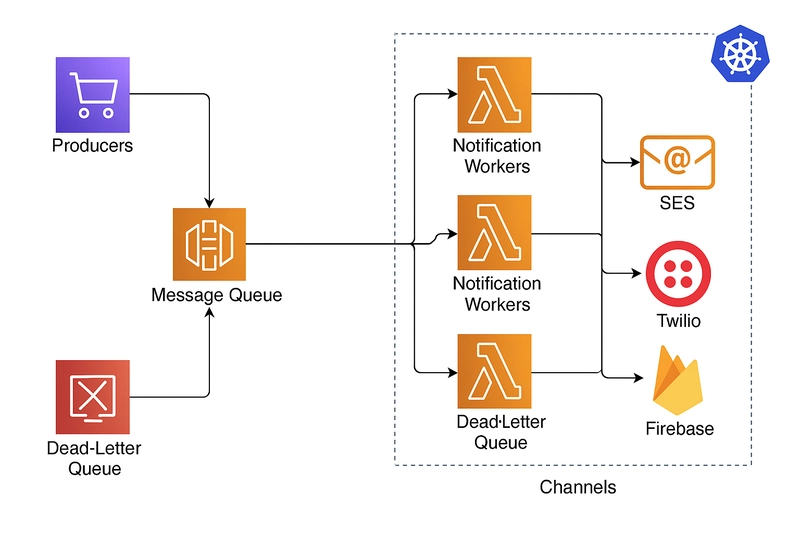
[Producers] --> [Ingress API] --> [Message Broker (Kafka/SQS)] --> [Worker Pool]
      |                                                          |
      v                                                          v
[User Pref DB / Cache]                                       [Channel adapters]
                                                              /   |
                                                           APNs  SMS  Email
                                                                 |   /
                                                           [Delivery logs + DLQ]
Event Sources and Producers
Types of Event Sources
- User Actions: Message sent, order placed.
- System Events: Payment completed, account locked.
- Scheduled Jobs: Reminders, digests.
- External Integrations: Carrier status updates, shipment feeds.
Event Prioritization
- High Priority: OTPs, security alerts.
- Medium Priority: Transaction updates.
- Low Priority: Marketing, recommendations.
Event Payload Design (recommended JSON schema)
{
  "event_id": "uuid-v4",
  "event_type": "ORDER_SHIPPED",
  "priority": "MEDIUM",
  "user_id": "user-123",
  "tenant_id": "org-456",
  "timestamp": "2025-12-06T12:34:56Z",
  "payload": {
    "order_id": "order-789",
    "tracking_url": "https://carrier/track/..."
  },
  "channels": ["PUSH", "EMAIL"],        // optional override
  "idempotency_key": "user-123-order-789"
}
Message Queues and Brokers
Queues decouple producers and consumers, provide buffering, and enable backpressure.
Broker Choices and When to Use Them
- Kafka: High-throughput, retention, replayability, partitioning — ideal for streaming and extremely high-volume notification pipelines. ([Apache Kafka][4])
- RabbitMQ: Flexible routing patterns and acknowledgement semantics; good for complex routing and smaller scale.
- AWS SQS / Google Pub/Sub: Fully managed, simpler operational model — use when you want less ops overhead. Comparison references show Kafka is chosen for heavy throughput and replay; SQS for simpler durable queues. ([DataCamp][5])
Design Patterns
-
Topic per logical stream:
notifications.events,notifications.audit,notifications.deadletter. -
Partitioning key: Use
user_id % partitionsto distribute load and keep per-user ordering when needed. - DLQ (Dead Letter Queue): For events that repeatedly fail after retries.
Notification Delivery Mechanisms
Push Notifications
- Use FCM for Android and cross-platform convenience; APNs for direct iOS delivery (FCM often proxies to APNs for iOS). See FCM docs. ([Firebase][1])
- Device token handling: store tokens, handle invalidation, rotate stale tokens.
- Payload size limits exist; keep messages small.
Email
- Use a transactional provider (SendGrid, SES) for deliverability and ISP reputation management. Authenticate domains with SPF/DKIM/DMARC. ([SendGrid][2])
SMS
- Use gateway providers (Twilio, Nexmo) and follow local regulations; consider long-code vs short-code for deliverability and throughput. ([Twilio][3])
In-app
- Use WebSockets or SSE for real-time in-app messaging; persist notifications to enable history and unread counts.
Channel Selection Logic
- Respect user preferences, priority, channel availability, and cost constraints. E.g., prefer push for engagement, SMS for critical security messages if push unavailable.
User Preferences and Personalization
Storage & Access
- Database: store canonical preferences (Postgres / DynamoDB).
- Cache: Keep current preferences in Redis for low-latency reads.
- Schema (SQL-like):
CREATE TABLE user_notification_preferences (
  user_id UUID PRIMARY KEY,
  email_enabled BOOLEAN DEFAULT TRUE,
  sms_enabled BOOLEAN DEFAULT FALSE,
  push_enabled BOOLEAN DEFAULT TRUE,
  quiet_hours JSONB, -- example: {"start":"22:00","end":"07:00","tz":"Asia/Kolkata"}
  updated_at TIMESTAMP
);
Personalization Techniques
- Templates with variables, user locale/timezone, AB testing for copy/CTA.
- Use server-side rendering for transactional content (receipts) and lightweight templates for push/SMS.
Regulatory Compliance
- Enforce opt-out and consent records (audit trail), support right-to-be-forgotten requests, and ensure CAN-SPAM/TCPA/GDPR compliance where applicable. ([SendGrid Support][6])
Scaling the Notification System
Horizontal scaling
- Make workers stateless. Use autoscaling groups or k8s HPA for workers.
- Use consumer groups for Kafka to parallelize consumption.
Partitioning and Sharding
- User-based sharding ensures per-user ordering (if required).
- Channel-based separation isolates channel-specific bottlenecks (e.g., push pool separate from SMS pool).
- Region-based deployment: run clusters near user populations to reduce latency.
Caching
- Cache user preferences and device tokens in Redis to reduce DB load.
Elasticity
- Pre-warm connections to third-party providers when expecting spikes (e.g., holiday campaigns).
- Implement circuit breakers and graceful degradation: drop low-priority notifications under high load.
Ensuring Reliability and Delivery Guarantees
Delivery Semantics
- At-Least-Once with idempotency keys is a practical approach: retry until ack while ensuring dedupe on final delivery.
-
Idempotency keys: use
event_idoridempotency_keyalong withuser_idto dedupe.
Retry Strategy
- Exponential backoff with jitter. Example algorithm:
function backoff(attempt) {
  const base = 1000; // 1s
  const max = 60 * 1000; // 1 minute
  const jitter = Math.random() * 0.5 + 0.75;
  return Math.min(base * Math.pow(2, attempt), max) * jitter;
}
Dead-Letter Queue (DLQ)
- After N retries, move to DLQ for manual inspection or offline reprocessing.
Fallback Channels
- If push delivery fails for a critical alert, escalate to SMS/email as fallback (subject to user preferences and cost policy).
Idempotency Implementation (sample)
- Store
delivered_events(user_id, idempotency_key)with TTL (e.g., 7 days). - When a worker processes an event:
- Check delivered_events. If exists, mark as duplicate and ack.
- Otherwise, attempt send; on success insert delivered_events and ack.
Example Redis flow (pseudo):
SETNX delivered:{user_id}:{idempotency_key} 1
EXPIRE delivered:{user_id}:{idempotency_key} 604800
Code Examples
Example: Node.js Kafka Consumer that Processes Notifications (simplified)
// Requires: kafkajs
const { Kafka } = require('kafkajs');
const axios = require('axios'); // to call channel providers

const kafka = new Kafka({ clientId: 'notif-service', brokers: ['kafka:9092'] });
const consumer = kafka.consumer({ groupId: 'notif-workers' });

async function sendPush(deviceToken, payload) {
  // call FCM / APNs adapter; adapter handles auth, token refresh
  return axios.post('https://push-adapter/push', { deviceToken, payload });
}

async function processMessage(message) {
  const event = JSON.parse(message.value.toString());
  const dedupeKey = `delivered:${event.user_id}:${event.idempotency_key}`;
  const wasSet = await redis.setnx(dedupeKey, '1');
  if (!wasSet) {
    // already processed
    return;
  }
  await redis.expire(dedupeKey, 7 * 24 * 60 * 60); // 7 days

  // check user preferences from cache or DB
  const prefs = await getUserPrefs(event.user_id);
  if (!shouldSend(prefs, event)) return;

  // choose channel
  if (prefs.push_enabled) {
    await sendPush(prefs.device_token, buildPushPayload(event));
  } else if (prefs.sms_enabled) {
    await sendSMS(prefs.phone, buildSmsText(event));
  } else if (prefs.email_enabled) {
    await sendEmail(prefs.email, buildEmailHtml(event));
  }
}

(async () => {
  await consumer.connect();
  await consumer.subscribe({ topic: 'notifications.events', fromBeginning: false });
  await consumer.run({
    eachMessage: async ({ topic, partition, message }) => {
      try {
        await processMessage(message);
      } catch (err) {
        // push to DLQ after logging
        await pushToDLQ(message);
      }
    }
  });
})();
Retry & Backoff Example (Node.js)
async function withRetries(fn, maxAttempts = 5) {
  for (let attempt = 0; attempt < maxAttempts; attempt++) {
    try {
      return await fn();
    } catch (err) {
      if (attempt === maxAttempts - 1) throw err;
      const waitMs = backoff(attempt);
      await sleep(waitMs);
    }
  }
}
Observability: Monitoring and Logging
Key Metrics
- Throughput (notifications/sec) per channel.
- End-to-end latency (event creation → delivery).
- Failure rate and retries.
- Queue lag and DLQ size.
- Provider-specific metrics (e.g., Twilio delivery status).
Logging & Tracing
- Structured logs (JSON) with
event_id,user_id,channel,status, andlatency. - Distributed tracing to link producer → queue → worker → provider.
- Real-time dashboards and alerts (PagerDuty) for spikes in failure rate or queue depth.
Example Alerts
- Queue backlog exceeds threshold.
- SMS provider failure rate > 5% (example threshold). ([Twilio][3])
Testing, Reliability Engineering & Chaos
Testing Strategies
- Unit tests for formatting, preference checks, rate-limits.
- Integration tests with sandboxed providers or mocks.
- Load testing to validate throughput and auto-scaling.
- Canary releases for worker changes.
Chaos Engineering
- Simulate provider outages (e.g., blocking APNs or Twilio) and ensure fallbacks work.
- Test DLQ replay behavior and idempotency guarantees.
Security, Privacy & Compliance
- Secure credentials (use vaults/secret manager).
- Encrypt PII in transit and at rest.
- Log consent changes and retention windows for GDPR.
- Rate-limit SMS/email to prevent abuse and limit costs.
- Implement role-based access control for operations dashboards.
Cost vs Latency vs Reliability: Trade-offs
| Concern | Low-Latency Priority | Low-Cost Priority | High-Reliability Priority |
|---|---|---|---|
| Queue choice | Kafka (low-latency partitioning) | SQS (managed cost) | Kafka or SQS with replication |
| Delivery | Push & SMS | Email/push (cheaper) | Multi-channel fallback |
| Provisioning | Pre-warmed connections | On-demand scaling | Over-provision / high-availability multi-region |
| Retries | Short backoff, aggressive | Fewer retries to reduce cost | More retries, DLQ for manual handling |
Explain choices in interviews: e.g., choose Kafka for high throughput and replay, but explain operational cost and complexity; choose SQS if ops-free and throughput fits. ([Apache Kafka][4])
Operational Runbook (short checklist)
- Monitor queue lag and scale consumers when backlog > X minutes.
- If provider error rate spikes, switch traffic to fallback or degrade promotional notifications.
- Rotate device tokens daily cleanup for dead tokens.
- Monitor cost-per-message for SMS; apply campaign throttles.
- Security incident: revoke provider keys and fail closed for critical notifications.
Appendix: Implementation Patterns & Advanced Topics
Ordering Guarantees
- Per-user ordering: use partition key as
user_idto ensure events for a user are consumed in created order.
Multi-tenancy
- Tenant-aware routing: include
tenant_idin event metadata and configure per-tenant provider settings (e.g., specific email domain or SMS sender).
Bulk vs Real-time
- Real-time: OTPs, fraud alerts — push immediately.
- Batch: Daily digests or marketing — aggregate and send as batch jobs to reduce cost and rate-limit provider usage.
Provider Pooling & Connection Management
- Maintain pools of HTTP/HTTP2 connections to push providers to reduce cold-start latency. Pre-warm connections before a campaign.
References & Further Reading (authoritative sources)
- Kafka Use Cases and Architecture. ([Apache Kafka][4])
- FCM & APNs push docs. ([Firebase][1])
- Kafka vs SQS comparison & guidance. ([DataCamp][5])
- Twilio SMS deliverability and best practices. ([Twilio][3])
- SendGrid / Email deliverability practices. ([SendGrid][2])
Closing: How to Use This in Interviews
- Start by clarifying requirements and constraints (SLA, scale, budget).
- Present a high-level pipeline and justify each major choice (Kafka vs SQS, provider selection).
- Discuss edge-cases: delivery guarantees, idempotency, rate-limits.
- Show code snippets and data models for critical parts (user prefs, idempotency) — include cost/latency trade-offs.
- Finish by describing operations: monitoring, alerts, and incident playbooks.
