Dev tools Hub API

This is a submission for the Xano AI-Powered Backend Challenge: Production-Ready Public API
What I Built
Title: DevTools Resource Hub API
Available: True
DevTools API’s:
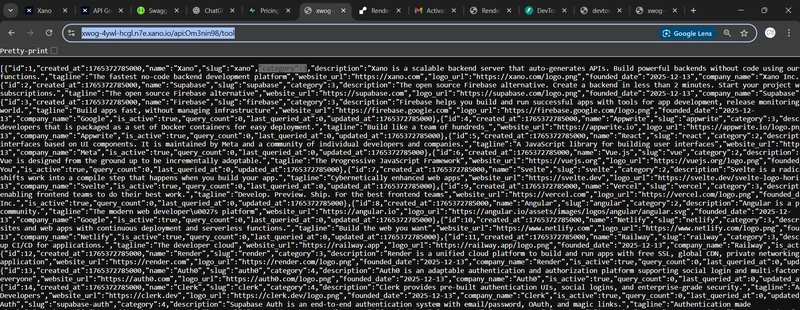
- Xano Hub API: https://xwog-4ywl-hcgl.n7e.xano.io/api:Om3nin98
- Xano Assisted Production API: https://devtools-hub-api.onrender.com/
Software Backend Architecture
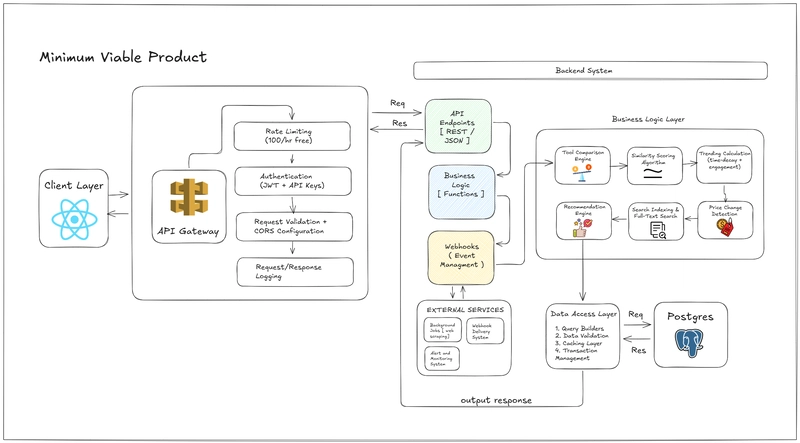
The backend follows a layered, modular design suitable for an MVP.
API endpoints expose REST interfaces, protected by authentication, rate limiting, and validation. Core business logic is isolated into services like search, recommendations, and scoring. A data access layer handles queries, caching, and transactions on PostgreSQL.
Event handling and background jobs enable scalable, asynchronous integrations.
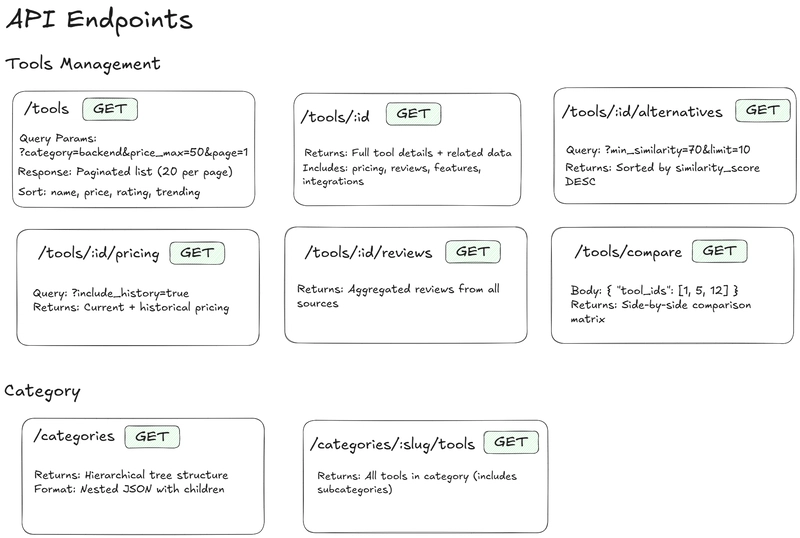
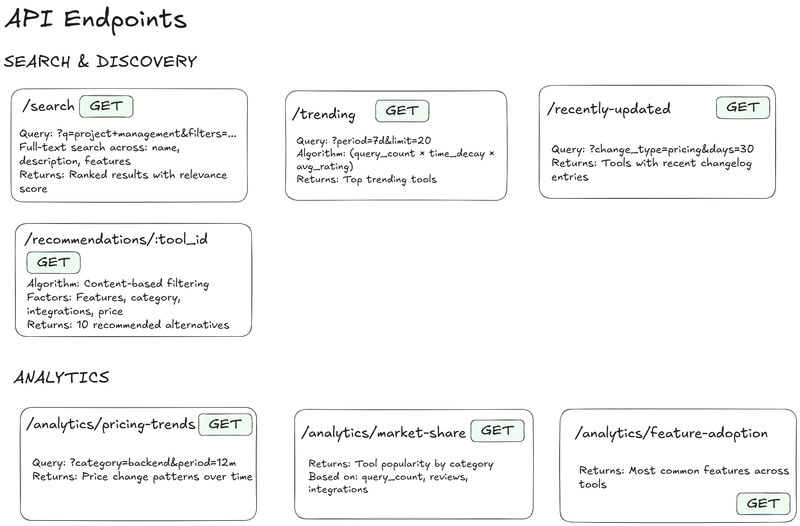
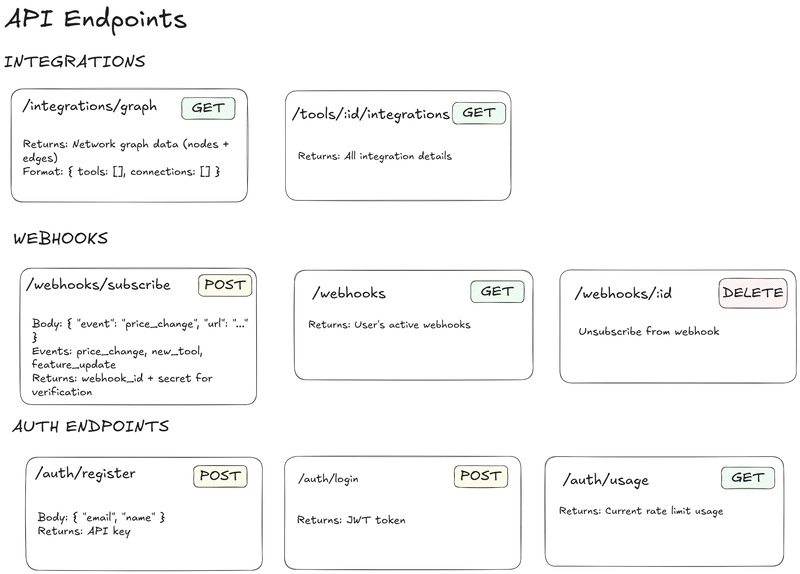
This will give a simple representation of caching Strategy
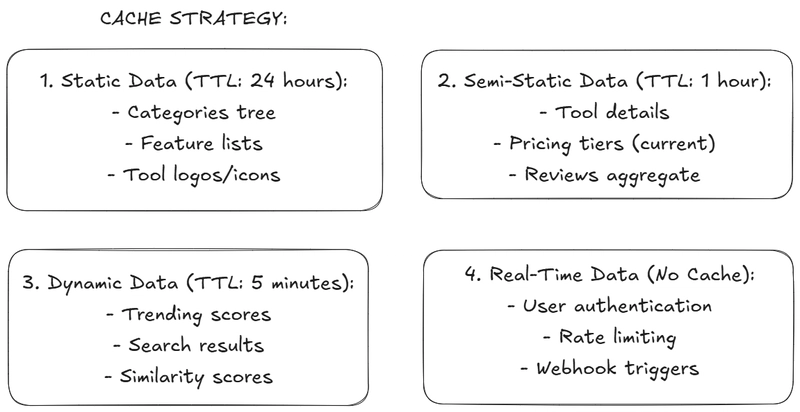
Databases
tools
| Column Name | Type | Constraints / Description |
|---|---|---|
| id | SERIAL | Primary Key |
| name | VARCHAR(255) | Unique, Not Null |
| slug | VARCHAR(255) | Unique, URL-safe |
| category_id | INTEGER | FK → categories.id |
| description | TEXT | Tool description |
| tagline | VARCHAR(500) | Short marketing line |
| website_url | VARCHAR(500) | Official website |
| logo_url | VARCHAR(500) | Logo image URL |
| founded_date | DATE | Company founding date |
| company_name | VARCHAR(255) | Company behind the tool |
| is_active | BOOLEAN | Default: true |
| query_count | INTEGER | Default: 0 (trending score) |
| last_queried_at | TIMESTAMP | Last API query time |
| created_at | TIMESTAMP | Default: now() |
| updated_at | TIMESTAMP | Default: now() |
Indexes
- category_id
- slug
- is_active
- (query_count, last_queried_at)
categories
| Column Name | Type | Constraints / Description |
|---|---|---|
| id | SERIAL | Primary Key |
| name | VARCHAR(255) | Unique, Not Null |
| slug | VARCHAR(255) | Unique |
| parent_id | INTEGER | Self FK → categories.id |
| description | TEXT | Category description |
| icon | VARCHAR(100) | Icon identifier |
| display_order | INTEGER | Default: 0 |
| created_at | TIMESTAMP | Created timestamp |
Indexes
- parent_id
- slug
pricing_tiers
| Column Name | Type | Constraints / Description |
|---|---|---|
| id | SERIAL | Primary Key |
| tool_id | INTEGER | FK → tools.id (CASCADE) |
| tier_name | VARCHAR(100) | Free, Starter, Pro |
| monthly_price | DECIMAL(10,2) | Nullable |
| annual_price | DECIMAL(10,2) | Nullable |
| currency | VARCHAR(3) | Default: USD |
| billing_cycle | ENUM | monthly, annual, one-time |
| features_json | JSONB | Flexible features list |
| limits_json | JSONB | API limits, users, storage |
| is_current | BOOLEAN | Default: true |
| effective_from | TIMESTAMP | Pricing start |
| effective_to | TIMESTAMP | Nullable |
| created_at | TIMESTAMP | Created timestamp |
Indexes
- (tool_id, is_current)
- (effective_from, effective_to)
alternatives
| Column Name | Type | Constraints / Description |
|---|---|---|
| id | SERIAL | Primary Key |
| tool_id | INTEGER | FK → tools.id |
| alternative_id | INTEGER | FK → tools.id |
| similarity_score | DECIMAL(5,2) | Range: 0–100 |
| match_basis | ENUM | features, pricing, category |
| comparison_notes | TEXT | Comparison details |
| upvotes | INTEGER | Default: 0 |
| created_at | TIMESTAMP | Created timestamp |
| updated_at | TIMESTAMP | Updated timestamp |
Constraints
- UNIQUE(tool_id, alternative_id)
- tool_id ≠ alternative_id
Indexes
- tool_id
- similarity_score DESC
reviews_aggregate
| Column Name | Type | Constraints / Description |
|---|---|---|
| id | SERIAL | Primary Key |
| tool_id | INTEGER | FK → tools.id |
| source | VARCHAR(50) | g2, capterra, producthunt |
| avg_rating | DECIMAL(3,2) | Range: 0–5 |
| total_reviews | INTEGER | Review count |
| rating_breakdown | JSONB | {5:120,4:45,...} |
| source_url | VARCHAR(500) | Review page URL |
| last_scraped_at | TIMESTAMP | Scraping time |
| created_at | TIMESTAMP | Created timestamp |
Indexes
- (tool_id, source)
- avg_rating DESC
features
| Column Name | Type | Constraints / Description |
|---|---|---|
| id | SERIAL | Primary Key |
| tool_id | INTEGER | FK → tools.id |
| feature_name | VARCHAR(255) | Feature title |
| feature_category | VARCHAR(100) | Auth, API, Database |
| is_available | BOOLEAN | Default: true |
| tier_availability | VARCHAR(50) | free, pro, all |
| description | TEXT | Feature details |
| created_at | TIMESTAMP | Created timestamp |
Indexes
- tool_id
- feature_category
- is_available
changelog
| Column Name | Type | Constraints / Description |
|---|---|---|
| id | SERIAL | Primary Key |
| tool_id | INTEGER | FK → tools.id |
| change_type | ENUM | pricing, feature, update |
| change_summary | VARCHAR(500) | Short summary |
| change_details | TEXT | Detailed change |
| old_value | JSONB | Previous value |
| new_value | JSONB | Updated value |
| changed_at | TIMESTAMP | When change occurred |
| created_at | TIMESTAMP | Created timestamp |
Indexes
- (tool_id, changed_at DESC)
- change_type
integrations
| Column Name | Type | Constraints / Description |
|---|---|---|
| id | SERIAL | Primary Key |
| tool_id | INTEGER | FK → tools.id |
| integrates_with | INTEGER | FK → tools.id |
| integration_type | ENUM | native, api, webhook, zapier |
| ease_of_setup | ENUM | easy, medium, complex |
| documentation_url | VARCHAR(500) | Docs link |
| is_official | BOOLEAN | Default: false |
| created_at | TIMESTAMP | Created timestamp |
Indexes
- tool_id
- integrates_with
API Documentation
Got it 👍
Below is a dev.to–friendly Markdown version of your API documentation without tables, using clean headings, bullet points, and code blocks. You can paste this directly into a dev.to article.
🚀 DevTools Resource Hub API
A public API to discover, compare, price-check, and find alternatives for developer tools.
🧰 Tools API
1️⃣ Get All Tools
Endpoint
GET /tools/
Query Parameters
-
category(string, optional) – Filter by category -
price_min(number, optional) – Minimum price -
price_max(number, optional) – Maximum price -
features(array of strings, optional) – Required features -
sort(string, default: “name”) – Sorting field -
page(number, default: 1) – Page number -
size(number, default: 10) – Page size
Response
{
  "items": [
    {
      "id": 1,
      "name": "VS Code",
      "description": "Code editor redefined...",
      "price": 0,
      "category": "Development"
    }
  ],
  "total": 1,
  "page": 1,
  "size": 10
}
2️⃣ Get Tool by ID
Endpoint
GET /tools/{tool_id}
Response
{
  "id": 1,
  "name": "VS Code",
  "description": "Visual Studio Code is a lightweight but powerful source code editor...",
  "price": 0,
  "category": "Development",
  "features": ["IntelliSense", "Debugging", "Git Control"]
}
3️⃣ Get Tool Alternatives
Endpoint
GET /tools/{tool_id}/alternatives
Query Parameters
-
min_similarity(number, default: 50) -
limit(number, default: 10)
Response
{
  "alternatives": [
    {
      "id": 2,
      "name": "Sublime Text",
      "similarity_score": 85
    }
  ]
}
4️⃣ Get Tool Pricing
Endpoint
GET /tools/{tool_id}/pricing
Query Parameters
-
include_history(boolean, default: false)
Response
{
  "tool_id": 1,
  "current_price": 0,
  "pricing_plans": [
    { "plan": "Free", "price": 0, "features": ["Basic Features"] },
    { "plan": "Pro", "price": 5, "features": ["All Features"] }
  ]
}
5️⃣ Get Tool Reviews
Endpoint
GET /tools/{tool_id}/reviews
Response
{
  "tool_id": 1,
  "average_rating": 4.8,
  "reviews": [
    {
      "user": "Developer123",
      "rating": 5,
      "comment": "Best editor I've used!",
      "date": "2023-11-15"
    }
  ]
}
6️⃣ Compare Tools
Endpoint
POST /tools/compare
Request Body
{
  "tool_ids": [1, 2, 3]
}
Response
{
  "tools": [
    {
      "id": 1,
      "name": "VS Code",
      "price": 0,
      "features": ["IntelliSense", "Debugging", "Git Control"]
    },
    {
      "id": 2,
      "name": "Sublime Text",
      "price": 99,
      "features": ["Goto Anything", "Multiple Selections", "Command Palette"]
    }
  ],
  "comparison": {
    "price_range": { "min": 0, "max": 99 },
    "common_features": [],
    "unique_features": {
      "1": ["IntelliSense", "Debugging", "Git Control"],
      "2": ["Goto Anything", "Multiple Selections", "Command Palette"]
    }
  }
}
Perfect 👍
Here is the Categories API documentation converted into clean dev.to Markdown, without tables, matching the style of your Tools & Search docs.
You can paste this directly into dev.to.
/api/v1/categories
1️⃣ Get All Categories
Retrieve all categories or filter by a parent category.
Endpoint
GET /api/v1/categories/
Query Parameters
-
parent_id(number, optional) – Filter by parent category ID
Response
{
  "items": [
    {
      "id": 1,
      "name": "Development",
      "slug": "development",
      "parent_id": null,
      "description": "Development tools and IDEs",
      "icon": "code",
      "display_order": 1
    }
  ],
  "total": 1,
  "page": 1,
  "size": 10
}
2️⃣ Get Category by ID
Fetch details of a single category using its ID.
Endpoint
GET /api/v1/categories/{category_id}
Response
{
  "id": 1,
  "name": "Development",
  "slug": "development",
  "parent_id": null,
  "description": "Development tools and IDEs",
  "icon": "code",
  "display_order": 1,
  "created_at": "2023-01-01T00:00:00Z",
  "updated_at": "2023-01-01T00:00:00Z"
}
3️⃣ Get Tools in a Category
Retrieve all tools belonging to a category.
Optionally include tools from subcategories.
Endpoint
GET /api/v1/categories/{slug}/tools
Query Parameters
-
include_subcategories(boolean, default: true) – Include tools from child categories
Response
{
  "category": {
    "id": 1,
    "name": "Development",
    "slug": "development"
  },
  "tools": [
    {
      "id": 1,
      "name": "VS Code",
      "description": "Code editor redefined...",
      "price": 0,
      "category": "Development"
    }
  ],
  "total": 1
}
4️⃣ Create a Category
Create a new category.
Requires authentication.
Endpoint
POST /api/v1/categories/
Request Body
{
  "name": "Web Development",
  "slug": "web-dev",
  "parent_id": 1,
  "description": "Web development tools and frameworks",
  "icon": "globe",
  "display_order": 2
}
💡
slugwill be auto-generated if not provided.
Response
{
  "id": 2,
  "name": "Web Development",
  "slug": "web-dev",
  "parent_id": 1,
  "description": "Web development tools and frameworks",
  "icon": "globe",
  "display_order": 2,
  "created_at": "2023-01-02T00:00:00Z",
  "updated_at": "2023-01-02T00:00:00Z"
}
5️⃣ Update a Category
Update an existing category.
Requires authentication.
Endpoint
PUT /api/v1/categories/{category_id}
Request Body
{
  "name": "Web Development Tools",
  "description": "Updated description",
  "icon": "browser"
}
Response
{
  "id": 2,
  "name": "Web Development Tools",
  "slug": "web-dev",
  "parent_id": 1,
  "description": "Updated description",
  "icon": "browser",
  "display_order": 2,
  "created_at": "2023-01-02T00:00:00Z",
  "updated_at": "2023-01-03T00:00:00Z"
}
6️⃣ Delete a Category
Delete a category by ID.
Requires authentication.
Endpoint
DELETE /api/v1/categories/{category_id}
Response
{
  "success": true,
  "message": "Category deleted successfully"
}
📌 Example Usage
Get All Root Categories
GET /api/v1/categories/
Accept: application/json
Get Subcategories of a Parent Category
GET /api/v1/categories/?parent_id=1
Accept: application/json
Get Tools in a Category
GET /api/v1/categories/development/tools?include_subcategories=true
Accept: application/json
Create a New Category
POST /api/v1/categories/
Content-Type: application/json
Authorization: Bearer your_access_token_here
{
  "name": "Mobile Development",
  "description": "Mobile app development tools",
  "icon": "smartphone"
}
Update a Category
PUT /api/v1/categories/3
Content-Type: application/json
Authorization: Bearer your_access_token_here
{
  "name": "Mobile App Development",
  "description": "Tools for mobile application development"
}
Delete a Category
DELETE /api/v1/categories/3
Authorization: Bearer your_access_token_here
🔍 Search API
1️⃣ Search Tools
Endpoint
GET /search/tools
Query Parameters
-
q(string, required) – Search query -
category(string, optional) -
price_min(number, optional) -
price_max(number, optional) -
features(array of strings, optional) -
sort_by(string, default: “relevance”)
Response
{
  "results": [
    {
      "id": 1,
      "name": "VS Code",
      "description": "Code editor redefined...",
      "price": 0,
      "category": "Development"
    }
  ],
  "filters": {
    "categories": ["Development", "Design"],
    "price_range": { "min": 0, "max": 199.99 }
  }
}
2️⃣ Get Search Suggestions
Endpoint
GET /search/suggestions
Query Parameters
-
q(string, required) -
limit(number, default: 5)
Response
{
  "suggestions": [
    "code editor",
    "development tools",
    "IDE"
  ]
}
3️⃣ Get Search Filters
Endpoint
GET /search/filters
Response
{
  "categories": [
    { "id": 1, "name": "Development", "count": 45 },
    { "id": 2, "name": "Design", "count": 32 }
  ],
  "price_ranges": [
    { "min": 0, "max": 0, "count": 25 },
    { "min": 0, "max": 50, "count": 30 }
  ],
  "features": [
    { "name": "Free Plan", "count": 42 },
    { "name": "Open Source", "count": 35 }
  ]
}
❤️ Health Check
Health Status
Endpoint
GET /health
Response
{
  "status": "ok",
  "version": "1.0.0",
  "environment": "production"
}
Demo
api/v1/tools!

The AI Prompt I Used
Generate a complete backend system for a DevTools Resource Hub API, a public API to discover, compare, price-check, and recommend developer tools.
PART 1 – Database Schema (PostgreSQL / Xano-compatible)
Create 8 core tables: tools, categories, pricing_tiers, alternatives, reviews_aggregate, features, changelog, integrations.
Each table must include proper primary keys, foreign keys, enums, JSONB fields, defaults, constraints, and timestamps.
Support hierarchical categories, pricing history, similarity scoring, integrations, reviews aggregation, and changelog tracking.
Add all required indexes for performance (search, trending, filters, sorting).
Output schema as SQL CREATE TABLE statements or XanoScript-compatible JSON.
PART 2 – REST API Endpoints (15 total)
Implement endpoints for tools listing, tool details, alternatives, pricing, reviews, comparison, categories, category tools, search, trending, recently updated, recommendations, integrations graph, tool integrations, and pricing analytics.
All responses must follow a unified JSON format with success, data, and meta.
Support pagination, filtering, sorting, relevance ranking, and similarity-based recommendations.
Include proper error handling with standard error codes (400, 401, 404, 429, 500).
Output endpoints as Xano API configurations or endpoint definitions.
PART 3 – Authentication & Security
Create users, api_keys, and request_logs tables.
Implement API key–based authentication with bcrypt password hashing and SHA-256 API key storage.
Add rate limiting by tier (anonymous, free, paid) with hourly and daily tracking.
Create auth endpoints: /auth/register, /auth/login, /auth/usage.
Include CORS config, input validation, SQL injection protection, and tier-based authorization rules.
Output as Xano auth middleware or function definitions.
PART 4 – Business Logic Functions
Implement functions for similarity scoring, trending score calculation, query tracking, recommendations, price change detection, and full-text search.
Use weighted algorithms combining features, pricing, categories, integrations, popularity, and reviews.
Support background jobs and webhook triggers.
Output as XanoScript or JavaScript/TypeScript Lambda functions.
PART 5 – Sample Data Seeding
Generate realistic seed data for 20 tools across 5 categories (Backend, Frontend, Hosting, Auth, Database).
Include full tool info, pricing tiers, features, reviews, alternatives, and integrations.
Use real-world tools like Xano, Supabase, Firebase, React, Vercel, Auth0, PostgreSQL, etc.
Output as SQL INSERT statements or Xano-importable JSON.
How I Refined the AI-Generated Code
Master Backend Intelligence Prompt (SQL + Lambda)
Build advanced backend intelligence for a Developer Tools Platform using PostgreSQL SQL + JavaScript Lambda functions.
PART A – Similarity Scoring (SQL)
Create an optimized SQL query for calculate_similarity_score(tool_a, tool_b) that:
Computes feature overlap using array intersection
Calculates price similarity (NULL-safe)
Adds category exact-match bonus
Calculates integration overlap using EXISTS subqueries
Includes review rating similarity
Final weighted score:
Features 40%, Price 20%, Category 15%, Integrations 15%, Reviews 10%
Use CTEs, avoid N+1 queries, optimized joins only
PART B – Trending Algorithm (SQL)
Write a SQL query for /trending endpoint:
trending_score = query_count × EXP(-hours_since_last_query / 168) × ((avg_rating / 5) × LN(total_reviews + 1))
Filter is_active = true
Optional category filter
Time filters: 24h | 7d | 30d
Return top 20 (custom limit allowed)
Output: tool info, trending_score, query_count, avg_rating
Optimize for read-heavy workloads
PART C – Tool Comparison (SQL)
Create a single SQL query for /tools/compare:
Accept 2–5 tool IDs
Return structured JSON:
Basic info (name, logo, website)
Cheapest pricing tier
Feature matrix (all unique features, tool-wise availability)
Common vs unique features
Integration counts
Aggregated ratings
Handle NULLs as “Not Available”
No loops, JSON aggregation only
PART D – Pricing Trends Analytics (SQL)
Write SQL for /analytics/pricing-trends:
Last 12 months, grouped by month + category
Cheapest paid tier per tool
Average price per category per month
Month-over-month percentage change
Identify biggest price increases/decreases
Optional category filter
Output format optimized for charts
These all things have generated via xanoscript the TASKS, JOBS that trigger all fetch recent prices, analytics and trending score for products
My Experience with Xano
As you can see below images, As a Dev creating Database and using them on production is kind of headache task as we need to take care of availability, Rollbacks, Replication and a lot of task that xano has reduced a lot, along with scheduling the jobs and using serverless functions for this application is made easy, Even for pricing analysis for the tools i have used a Task as you can see below
The API Endpoint
https://price-change-9×01.onrender.com/pricing/{tool_id}?upload=true will track the price for tool and post it in pricing_tier and it is scheduled every day. It is made so much easy
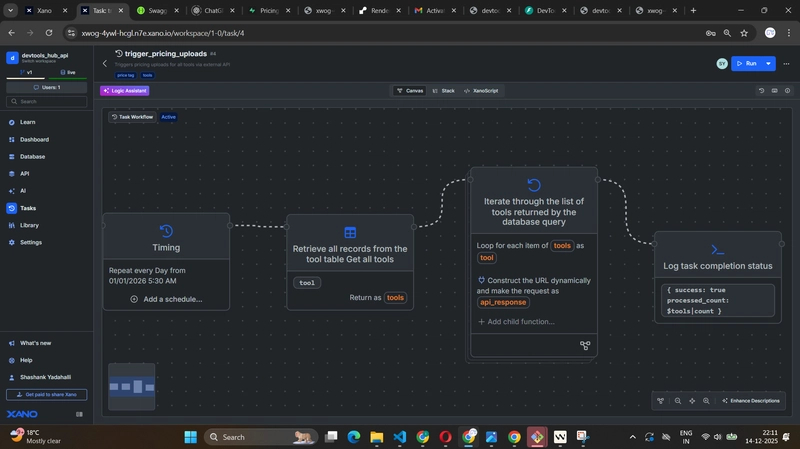
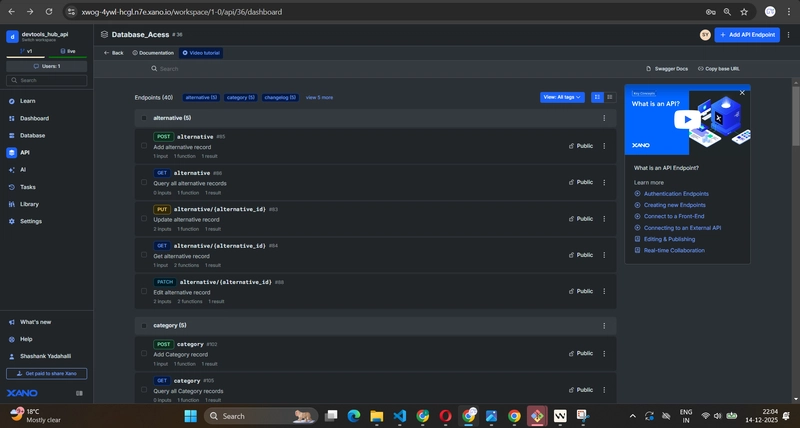
We can use the database directly via API endpoints created automatically is plus point on top of which we can use the API, the actually Prod deployed application of mine is using the same
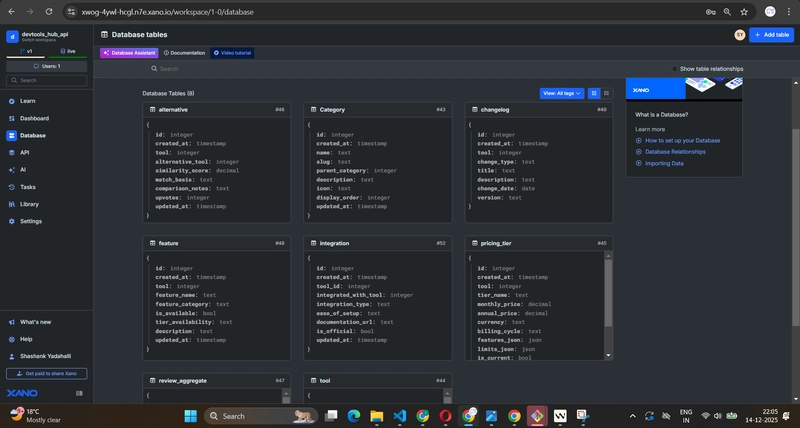
AI, TASK, DATABASE, API are the best things what i could able to use here. Small glimpse of Xanoscript as it is huge.
`// Triggers pricing uploads for all tools via external API
task trigger_pricing_uploads {
stack {
// Retrieve all records from the tool table
// Get all tools
db.query tool {
return = {type: “list”}
output = [“id”]
} as $tools
// Iterate through the list of tools returned by the database query
foreach ($tools) {
  each as $tool {
    // Construct the URL dynamically and make the request
    api.request {
      url = "https://price-change-9x01.onrender.com/pricing/" ~ $tool.id ~ "?upload=true"
      method = "GET"
    } as $api_response
  }
}

// Log task completion status
debug.log {
  value = {success: true, processed_count: $tools|count}
}
}
schedule = [{starts_on: 2026-01-01 00:00:00+0000, freq: 86400}]
tags = [“price tag”, “tools”]
}`
Github Repo Link: https://github.com/its-shashankY/Devtools_hub_api