
Bug Reports Should Fix Themselves: Dogfooding Our Slack Cloud Agent with GitHub and Linear

It’s a painful experience when you’re in the zone, and a notification pops up in Slack that you need to fix. Continue’s cloud agents turn Slack conversations into GitHub pull requests.
By connecting Slack and GitHub via Continue’s Mission Control Integrations, developers can fix bugs, address security issues, and ship changes without leaving the tools where they already work.
Maybe it’s a bug report, a 404 on a new page, or a logic error in an endpoint. Sure, it’s important, but it’s an interruption. Usually, the workflow looks like this:
- Read the Slack message
- Sigh
- Open Jira or Linear and create a ticket
- Open your IDE, stash your current work, and check out a new branch
- Reproduce the bug
- Fix it
- Push a commit, open a PR, and switch context back
That “quick fix” just cost you 45 minutes of flow state.
At Continue, we are building a world where your tools talk to Continue, and Continue takes action. We believe that if you can describe the fix in Slack, you shouldn’t have to leave Slack to implement it.
Here is how we use our own Slack integration to turn bug reports into Pull Requests without leaving the conversation.
The “Drive-By” Fix: Turning Slack Bug Reports into Pull Requests
Sometimes, the fix is obvious, but the friction to implement it is high. The same Slack agent that opens Pull Requests can also create and update Linear issues, assign owners, change states, and link work across systems.
Recently, our team noticed a bug where the inbox list view was loading as empty because it defaulted to the wrong tab. I posted a screen recording of the issue.
Nate knew exactly what the problem was. In a traditional workflow, Nate would have to stop what he was doing to go fix a default state in InboxPageClient.tsx.
Instead, the conversation went like this:
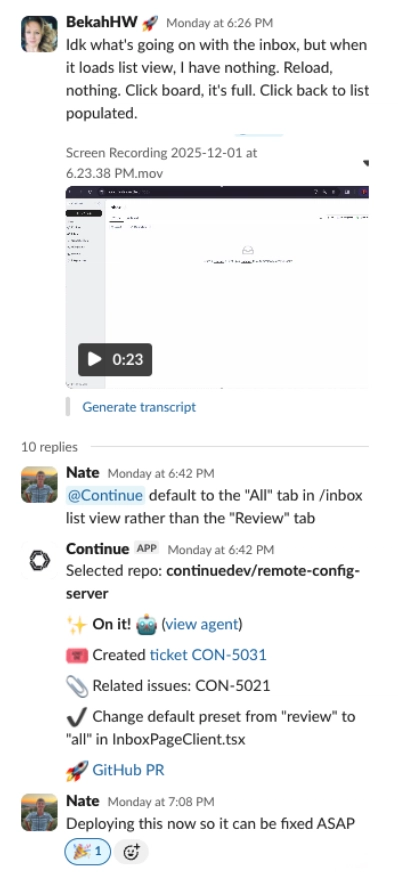
Continue:
- Looked at the selected repo: continuedev/remote-config-server
- Action: Created ticket CON-5031.
- Action: Changed default preset from “review” to “all”.
- Result: GitHub PR created.
Nate didn’t open his IDE. He didn’t stash his changes. He delegated the implementation to the cloud agent and moved on. Minutes later, the fix was deployed.
Slack as a Control Plane for Linear
The same Slack agent that creates Pull Requests can also work directly with Linear. In one Slack message, I asked Continue to update a Linear issue assigned to me, change the status, and leave a comment. I didn’t open Linear, search for the issue, or change context.

Behind the scenes, the Slack agent executed the request.
What the Slack agent did via the Linear MCP:
- Identified the correct Linear issue based on name and assignment
- Updated the issue status to In Progress
- Added a structured comment with actionable next steps
- Linked related internal tickets for traceability
This is a simple example, but it’s foundational. You can update status, assign owners, changing priority, link issues, directly from Slack. Slack becomes the interface. Linear becomes programmable. The agent handles the glue. If you want to take it a step further, you can call @Continue in the Linear issue and ask it to draft a PR as well.

From context switching to flow state. Continue turns Slack conversations into actions across your tools, so bug reports don’t pull you out of the zone.
Handling Logic & Security Flaws with Cloud Agents
It’s easy to assume AI agents are only good for simple one-liners. But we use them for architectural fixes, too.
Dallin, another engineer on the team, spotted a flaw in how we were handling permissions on an edit agent endpoint. The endpoint was checking the currently selected organization on the client side, rather than verifying the user’s rights to the specific agent file on the backend.
This is a nuance that requires understanding the codebase. Dallin tagged @Continue with the context:
“The edit agent file trpc endpoint has a flaw. It checks the currently selected org and sends that, it should just check if user has rights to edit that agent file on the backend…”
The agent didn’t just hallucinate a patch. If we look at the Mission Control view for this session, we can see what the cloud agent did:
- Search: It searched for editAgentFile and updateAgentFile to locate the relevant router.
- Read: It read src/trpc/routers/agent/agentRouter.ts to understand the current implementation.
- Analyze: It found the updateVisibility mutation and saw it was accepting orgOwnerId as an input parameter (the security flaw).
- Fix: It removed the parameter from the mutation and verified that packageProcedure was already handling the authorization correctly.
- Clean up: It even updated the NewAgentFileForm on the frontend to stop passing the now-removed parameter.
The agent removed the insecurity, cleaned up the TypeScript errors caused by the change, and opened a PR. Dallin reviewed the code, gave it a thumbs up, and the security hole was patched.
Why this Matters for Developer Workflow and Flow State
The goal of Continuous AI isn’t to replace developers; it’s to replace friction.
When you connect your tools—like Slack, Linear, and GitHub—to Mission Control, you aren’t just creating a chatbot. You are creating a programmable layer of automation that has context of your codebase with a cloud agent.
- Thread Context: The agent reads the thread. If you discuss the bug before tagging @continue, it uses that conversation as context.
- Mission Control: You can watch the agent work in real-time. If it gets stuck, you can jump in. If it succeeds, you get a PR link.
- Flow State: You stay where you are productive.
We built this integration because we were tired of the “context switch tax.” If you want to stop trading flow state for bug fixes, try connecting Slack to Continue today.
