Reverse Engineering Firmware at Scale with IDA Pro

Why reverse engineering matters
If you’ve ever stared at a stripped firmware image and asked, “Where does this boot? What does it talk to? Why does it lock up?”—you’ve already brushed against reverse engineering (RE).
I got into RE the same way many engineers do: not because it sounded glamorous, but because I had a binary, a bug, and not enough documentation. The reality is that modern engineering constantly runs into black boxes:
- 3rd‑party libraries you can’t fully audit
- legacy devices where the original team is long gone
- production firmware that differs from “the source” you were given
- security features (secure boot, update verification, anti‑rollback) you need to validate incident response—when something suspicious happens and you need answers fast
Reverse engineering is the discipline that turns those black boxes into something you can reason about. It’s not magic—it’s a set of workflows that convert raw bytes into evidence: control flow, data flow, memory maps, and behavioral clues.
What is Reverse Engineering?

Reverse engineering (RE) is the process of understanding how a system works by studying the thing you already have — often a compiled program or firmware image — even when you don’t have the original source code or documentation.
In software, RE typically means taking a binary (EXE/ELF/firmware), inspecting its machine code and data, and reconstructing higher-level meaning: which functions exist, how control flows, what protocols or file formats are used, and where key features live.
You can think of it as turning an opaque blob into a map you can navigate, reason about, and communicate to others.
How RE Helps Solve Real-World Software Problems
In embedded and firmware work, reverse engineering isn’t just a security hobby — it’s often the fastest way to unblock real engineering tasks when the usual inputs are missing.
Common situations where RE helps:
• Vendor documentation is incomplete (or NDA-bound), but you still need to integrate hardware features correctly.
• You inherit a device/board with unknown firmware behavior and need to debug boot failures, watchdog resets, or update issues.
• A field unit behaves differently across versions and you must identify what changed (protocol handling, safety checks, timing).
• You need to validate security properties (secure boot checks, key rotation, update signatures) from the actual binary — not just a spec.
• You’re interfacing with a black-box peripheral/protocol and want to reconstruct message formats from code paths and memory accesses.
The key outcome is actionable understanding: which functions implement a feature, what inputs they expect, what states they maintain, and where to patch, instrument, or monitor.
What RE actually looks like in practice
At a high level, most firmware RE sessions follow the same arc:
• Disassembly: you start from instructions, not source code.
• Structure discovery: entry points, init code, interrupt vectors, call relationships.
• Meaning extraction: names, parameters, “what this function is really doing.”
• Hardware context: memory‑mapped I/O (MMIO), peripheral registers, boot ROM expectations.
• Failure & edge behavior: loops, asserts, error handlers, watchdog patterns.
The catch is: doing this once is doable. Doing it repeatedly—across many builds or many devices—is where the pain lives. If your workflow is 90% manual clicking, you’ll spend most of your time re‑doing the same extraction steps instead of thinking like an engineer.
RE Automation vs Manual RE
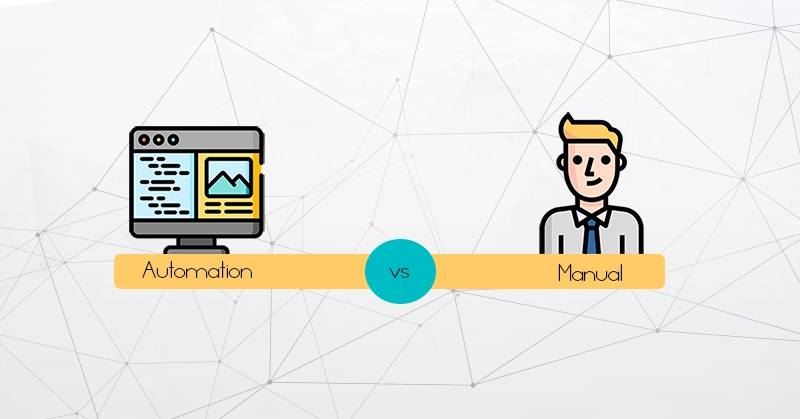
Manual RE is you driving the investigation interactively: following cross-references, renaming functions, annotating structures, and tracing control flow until the behavior makes sense.
Automation RE uses scripts to perform repeatable extraction and reporting tasks — things that are tedious by hand or easy to forget — such as:
• exporting function lists, call graphs, and string inventories
• extracting key regions (tables, vectors, jump dispatch) into structured artifacts
• generating Markdown/JSON reports so results are comparable across versions
The best workflow is hybrid:
• Use automation to generate a reliable “baseline map” fast.
• Use manual analysis to answer the hard questions (intent, state machines, edge cases).
• Feed your manual findings back into automation (naming, annotations, extraction rules) so your next target is faster.
In other words: automation gives you consistency and speed; manual RE gives you judgment. This kit is designed to teach both, with a pipeline that produces artifacts you can keep.
Tooling landscape: why IDA Pro keeps showing up
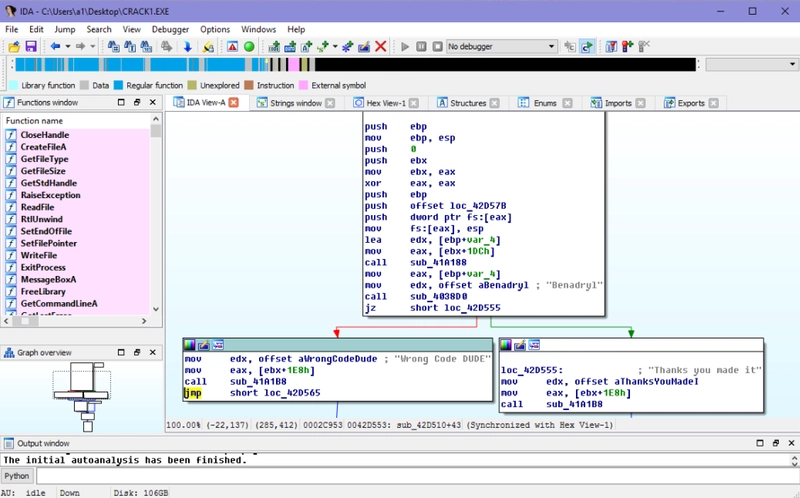
There are many solid tools in the RE ecosystem: Ghidra, Binary Ninja, radare2/rizin, objdump + GDB, Frida, and more. Each has strengths. But for firmware and bare‑metal work, I keep coming back to one practical truth:
If you want an interactive GUI and a programmable analysis engine in the same place, IDA Pro is hard to beat.
IDA’s value isn’t only in the UI. It’s in the ecosystem: a mature database model, rich cross‑references, and—most importantly for scale—automation via IDAPython scripts. Once you can script extraction, you stop “re‑discovering” facts and start generating artifacts.
Why I recommend IDA Pro (or Home) for automation—not IDA Free
This is the part many people miss when they first start: there’s a difference between using IDA as a viewer and using IDA as a pipeline engine.
For automation, you typically want to run IDA in a headless or unattended mode: load a binary, let analysis complete, run scripts, export reports, and exit. That’s how you scale to multiple targets, integrate with CI, or run overnight batches.
IDA Free is great for getting familiar with the UI, but it becomes a dead end when you want proper automation:
You can’t rely on IDAPython availability for tooling the way you can with licensed editions.
Headless scripting flags may be ignored, which means your script never executes and the process won’t terminate cleanly.
That makes “batch RE” fragile unless you add external timeouts and manual fallbacks.
If your goal is to learn repeatable reverse engineering—not just one‑off browsing—start with an edition that supports the workflow you eventually want.
The mindset shift: stop “looking” and start “producing artifacts”
When RE becomes part of your engineering workflow, the deliverable isn’t “I clicked around and I think I understand it.” The deliverable is a folder of artifacts you can diff, review, and share with your team:
• Call graphs (DOT/JSON) to see boot and initialization flows
• Memory access reports to highlight MMIO regions and suspicious reads/writes
• Failure path reports to flag dead loops, error handlers, watchdog patterns
• Per‑function summaries you can use as a navigation index
• A run log that tells you exactly what happened (and what didn’t)
Once you have those, your RE sessions become shorter and sharper. Instead of spending 45 minutes finding the boot path again, you open a graph, pick the interesting node, and move straight to the questions that matter.
Where my eBook fits: IDA Pro headless automation, taught as a workflow
That gap—between “I can use IDA” and “I can automate IDA”—is exactly why I wrote my eBook:
IDA Reverse Engineering Automation Kit — a practical guide and solution kit for building a repeatable IDA Pro pipeline (GUI + headless) aimed at firmware/bare‑metal targets.
Instead of treating RE like a purely manual art, the kit teaches an engineering workflow: configuration‑driven runs that produce predictable outputs. It also includes hands-on labs using a toy RISC‑V firmware so you can validate what the artifacts mean without guessing.
What you’ll be able to do after working through it
• Run a full analysis pipeline in a single command (ideal for batch processing).
• Export boot‑path call graphs in DOT/JSON so you can visualize control flow quickly.
• Generate MMIO‑focused memory access reports to spot peripheral interactions fast.
• Automatically detect failure loops / dead‑end paths to accelerate debugging and security review.
• Customize a target config (entry points, memory maps, graph depth) and see how outputs change.
Who this is for
• Firmware engineers debugging boot issues without full source context
• Security researchers looking for verification gates, error handlers, and suspicious IO
• Embedded engineers who want an “artifact-first” workflow that scales
• Students who want to learn RE beyond screenshots—by running a pipeline and interpreting outputs
If you’re curious, the best way to judge whether this style fits you is simple: ask yourself whether you’d rather spend your time clicking through the same discovery steps—or start each session with a clean set of generated facts.
References
IDA is developed by Hex-Rays. Download IDA from Hex-Rays’ official site:
IDA Home (for hobbyist/non-commercial use): download and purchase from the official IDA Home page on Hex-Rays (the page provides the purchase + download path).
IDA Pro (commercial): download via the My Hex-Rays customer portal after purchase (this is where you get the installer and license file / activation details).
Tip: Always prefer the official Hex-Rays download sources to avoid tampered installers.
As for my eBook Reverse Engineering Study Kit, You can purchase the eBook on Gumroad here! After purchase, Gumroad will email you the download link.
Closing thoughts
Reverse engineering isn’t just for malware analysts. It’s an engineering tool for clarity. And like any tool, it becomes dramatically more powerful when you can automate the boring parts.
If you want to learn how to build a repeatable IDA Pro workflow that generates real artifacts—call graphs, MMIO reports, failure paths—and do it in a way you can scale, my eBook is designed to be the shortest path from “I’m curious about RE” to “I can run a pipeline and get answers.”