
Test Your Use Case with Postman

You can use the Postman platform to test and build with the TabaPay API, alongside thousands of other APIs. Postman is used by more than 30 million users and more than half a million organizations, and now it’s easy to join them.
TabaPay now offers a Postman Collection, a bundle of API requests that will help you try out the TabaPay API for your use case. Explore your use cases to accept payments, payout funds, and test advanced payment features, all from a controlled Sandbox environment.
Our Postman Collection will help you:
- Make your first successful API call
- Understand required credentials and environment variables
- Safely test real-world payment flows before production
- Capture request and response fields used in the TabaPay API.
Why TabaPay API? Build for Scale, Security, and Reliability
TabaPay powers instant, real-time money movement for thousands of businesses across the U.S. and Canada—and is better than ever thanks to a newly revamped client portal.
The TabaPay API is engineered to operate at high scale while maintaining industry-leading security and availability.
TabaPay Highlights:
- Up to 50% lower fraud rates compared to industry averages
- 2M+ transactions settled daily
- $8B+ settled monthly
- $230B+ total volume processed since inception
- 1.9B+ transactions processed
- Number #6 U.S. Card-Not-Present (CNP) acquirer
Infrastructure & Availability:
- 99.99% system uptime
- 19 banking partners and growing, providing network redundancy
What’s Included in the Postman Collection
The TabaPay Postman Collection includes:
- Pre-configured requests to test the Unified API
- End-to-end flows for:
- Accepting payments (Pull)
- Payouts and disbursements (Push)
- Support for multiple payment instruments:
- Built-in scripting to automatically manage common Sandbox variables (optional)
Get Started
Before using the Postman Collection, you will need to begin your integration and compliance review with TabaPay. This includes receiving your Sandbox Credentials and whitelisting your IPs. To begin your implementation, email help@tabapay.com.
Step 1: Download the Collection
Download the TabaPay Postman Collection
Download Postman (if you don’t already have it installed)
Step 2: Configure Your Sandbox Environment
To begin testing, you’ll need to populate the following environment variables in your TabaPay Sandbox Environment. These values are provided by TabaPay when Sandbox credentials are issued.
You can customize the descriptions below or link to a credential reference page.
Required Environment Variables
Variable Name(s):
- FQDN: The Sandbox base URL you are testing against
- bearertoken: Authorization credential used to make authenticated API requests
- ClientID: Your unique 22-character client identifier issued during onboarding
Note: These values are sensitive credentials. Never expose them publicly or share them with anyone who is not authorized.
Step 3: Make Your First API Call
Once the environment variables are populated:
- Navigate to Retrieve Client
- Select Send
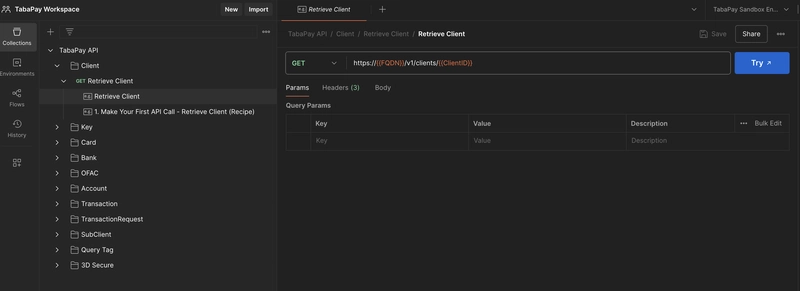
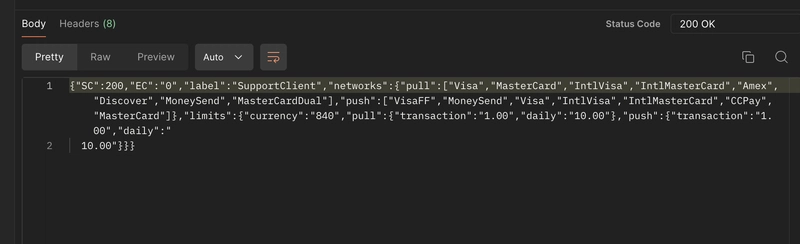
A successful response confirms:
- Your credentials are valid
- Your client configurations and limits
Your environment is configured correctly, and you’re ready to begin testing additional workflows
Tokenization
Tokenization is the process of replacing sensitive payment data (e.g. a card number or bank account number) with a unique, non-sensitive placeholder called a token. TabaPay enables its users to generate tokens in many different use cases, but one of the main uses is payment tokenization with Account IDs—rendered as the variable accountID. An accountID is TabaPay’s own unique set of 22-character string generated by Create Account that represents a single payment card number or bank account.
Managing accountIDs in Sandbox
Due to PCI standards, tokenized payment credentials are widely used among fintech platforms. Tabapay’s accountIDs are commonly used among clients for all use cases for both payment acceptance and payouts.
Using the TabaPay Postman Collection, you can generate these accounts in Sandbox.
To Generate an AccountID:
- Go to the TabaPay API Postman Collection
- Go to Account > Create Account
- Choose the request based on your payment instrument:
- Card
- Bank
- RTP-enabled bank
- Select Send
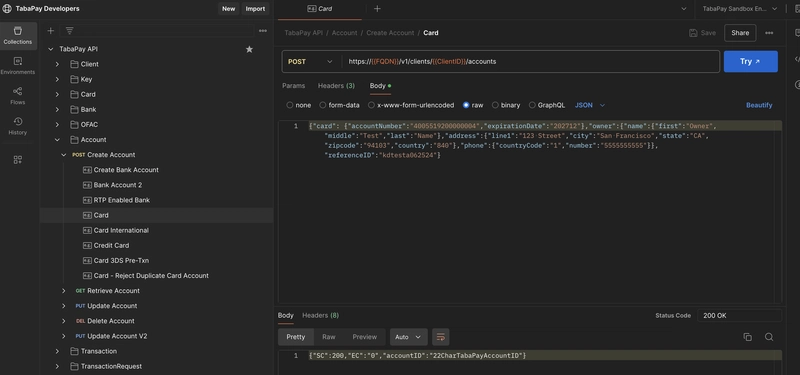
When the request succeeds:
- A new accountID is generated
- The Sandbox Environment variable is automatically updated under Current Value
- Once configured, you can freely test different payment flows using your generated accountID.
Optional: Disable Auto-Updates
If you are testing different use cases, and generating multiple accountIDs you may want to avoid automatically updating the accountID environment variable. If you prefer a more manual control to avoid the accountID variable automatically updating, complete the following:
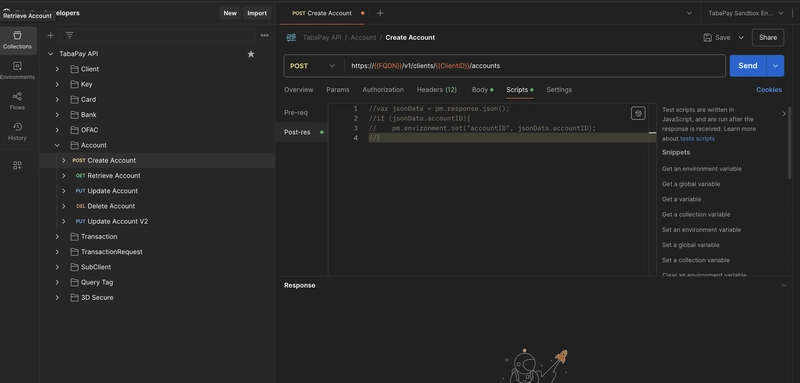
- Go to Collections > *TabaPay API *
- Select Account > POST Create Account
- Go to Scripts
- Paste in the following, comment out, or delete the script in Post-res (Post response).
JavaScript
//var jsonData = pm.response.json();
//if (jsonData.accountID){
// pm.environment.set("accountID", jsonData.accountID);
//}
Your accountIDs variable should now remain unchanged after creating new accountIDs.
Note: The script will be active by default you will need to comment out to disable.
Working with transactionIDs
The same process or updating will happen for the following unique IDs
- transactionIDs: Generated when transactions are created. The transactionID variable is automatically updated in your Sandbox Environment by default.
If you do not want this behavior:
- Navigate to the relevant Post Create Transaction – Pull Card, or, Post Create Transaction – Push Bank
- Go to the Scripts section > Post-res and follow the same steps as in Optional: Disable Auto-Updates.
Other Auto-Updates include
- KeyID: To remove go to Collections > Key > POST Create Key > Scripts > Post-res.
Types of Transaction Flows
Other transaction flows include:
- Create Transaction – Pull Card
- Create Transaction – Pull Bank
- Create Transaction – Push to Card
- Create Transaction – Push Bank
What’s Next?
At this point, you can:
- Explore additional payment features
- Modify request bodies to simulate real-world scenarios
- Validate end-to-end payment flows in Sandbox
To move forward with your integration and request Sandbox access:
📧 Email: help@tabapay.com, and please include:
- Your company name and website
- Intended use case
- A request for Sandbox credentials, and IP whitelisting
Our team will help you get up and running.
