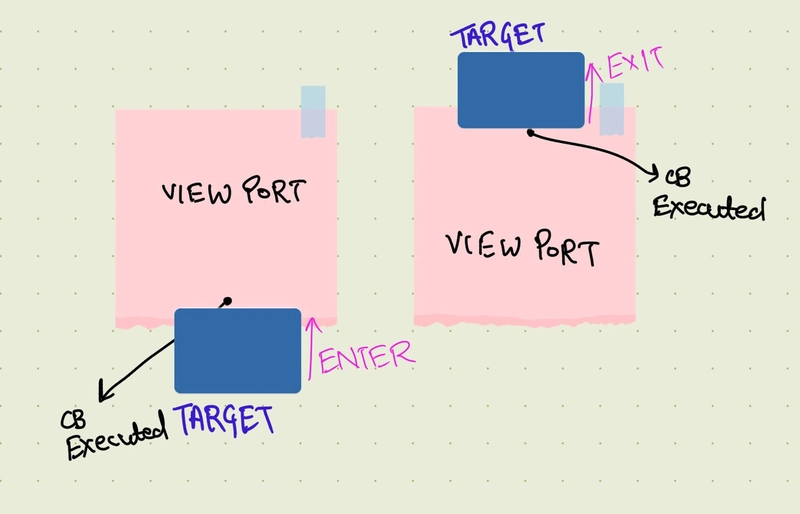
Intersection observer

what?
The Intersection Observer API is a modern JavaScript web API.
Observer lets you react when an element enters or leaves the viewport—efficiently and without performance pain.
Problem it solves.
Before Intersection Observer, detecting visibility usually meant:
- Listening to scroll events
- Manually calculating element positions
- Running that logic constantly while scrolling
That approach:
- Hurts performance
- Scales poorly as pages get complex
why?
Intersection Observer offloads all that work ****to the browser.
-
Much better performance
Browser handles visibility checks internally
No continuous scroll listeners
Callbacks run only when visibility changes
Result: smoother scrolling and lower CPU usage -
Cleaner, simpler code
Instead of math-heavy scroll logic, you get:
Clear declarative rules
A single observer watching multiple elements
You describe what you care about, not how to calculate it. - Perfect for lazy loading
Common use cases:
Images/videos load only when near the viewport
Infinite scrolling
Initial page load time
-
Great for UI effects
Use it for:
Animations on scroll
Revealing sections
Highlighting nav items
Tracking impressions (analytics) -
Works asynchronously
Runs off the main scroll event loop
Won’t block rendering
This is huge for complex or animation-heavy pages.
When not to use it
If you need pixel-perfect scroll positions
If you need to react to e very single scroll tick
Intersection Observer is about state changes, not continuous tracking.
how?
const observer = new IntersectionObserver(cb,options);
Step 1: Define the callback function that runs when an intersection occurs.
.
//cb

.
const handleIntersection (entries,observer) => {
// work with entries[]
// each entry you can get
- intersectionRatio (what percent of target element is visible on screen).
- isIntersecting (Boolean)
- target
// perform action - load an image, start an animation
// optional _ to stop observing observer.unobserve(entry.turget);}

}