AWS Lambda: The Serverless Engine Powering Cloud Automation

AWS Lambda is one of the most powerful and popular services in the AWS ecosystem. It allows you to run application logic without managing servers, making it ideal for automation, event-driven workflows, and lightweight backend tasks. With Lambda, you simply upload your code and define a trigger—AWS handles provisioning, scaling, and execution automatically.
What Is AWS Lambda?
AWS Lambda is a serverless compute service that executes your code in response to events. It supports languages like Python, Node.js, Java, Go, and more. There is no need to create or manage EC2 servers. Instead, Lambda runs your function in a fully managed environment, scales instantly, and charges you only for the compute time consumed.
Key Characteristics
- No servers to configure or maintain
- Automatic scaling from 0 to thousands of requests
- Pay-per-use billing model
- Deep integration with AWS services

Why Is AWS Lambda So Popular?
1. Completely Serverless
You don’t need to provision, patch, or maintain any infrastructure. Lambda removes the operational burden from developers and cloud teams.
2. Automatic, Instant Scaling
Lambda scales based on event load. Whether 1 or 1,000 requests, it adjusts automatically without any configuration.
3. Highly Cost-Effective
Since Lambda charges only when your function executes, there’s no cost for idle time. This makes it ideal for workloads with unpredictable volume.
4. Event-Driven Architecture
Lambda works natively with services like:
- S3
- DynamoDB
- CloudWatch
- EventBridge
- SNS / SQS
- API Gateway
This makes it perfect for automation, integrations, and reactive systems.
5. Multi-Language Support
Lambda supports Python, Node.js, Java, Go, .NET, Ruby, and custom runtimes—giving teams flexibility to choose the best language.
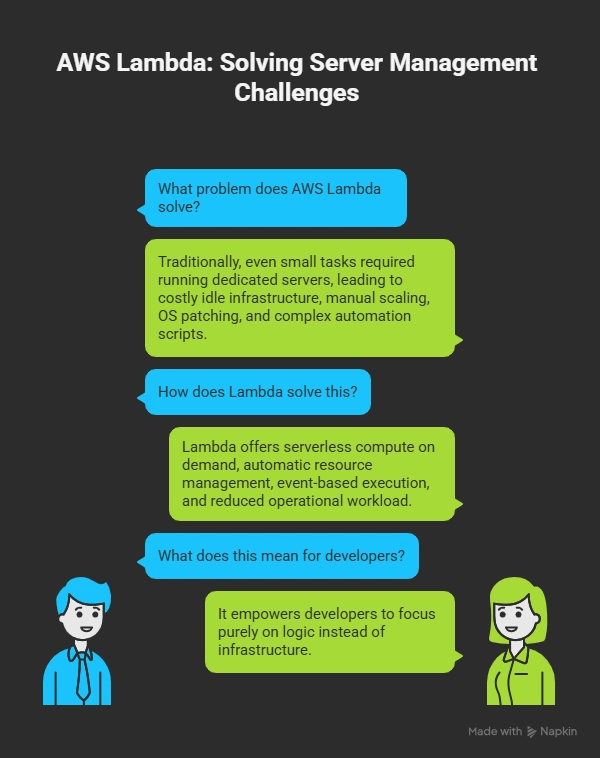
What Problem Does AWS Lambda Solve?
Traditionally, even small tasks required running dedicated servers—leading to:
- Costly idle infrastructure
- Manual scaling
- OS patching and maintenance
- Complex automation scripts
Lambda solves this by offering:
- Serverless compute on demand
- Automatic resource management
- Event-based execution
- Reduced operational workload
It empowers developers to focus purely on logic instead of infrastructure.
Three Real-World Use Cases of AWS Lambda
Below are three practical AWS Lambda use cases (without code), based on your requirement:
1. Automatically Delete Historical Snapshots
Organizations create regular EBS snapshots but often forget to delete old ones, increasing storage cost over time.
How Lambda Helps
- A scheduled EventBridge rule triggers your Lambda daily.
- Lambda fetches all EBS snapshots.
- It identifies snapshots older than a set retention period.
- It deletes those snapshots automatically.
Benefits
- Saves storage cost
- Ensures retention compliance
- Eliminates manual cleanup
import boto3

ec2 = boto3.client('ec2')

def lambda_handler(event, context):
    # Describe all snapshots owned by you
    snapshots = ec2.describe_snapshots(OwnerIds=['self'])['Snapshots']

    for snap in snapshots:
        snap_id = snap['SnapshotId']
        print(f"Deleting Snapshot: {snap_id}")
        try:
            ec2.delete_snapshot(SnapshotId=snap_id)
        except Exception as e:
            print(f"Error deleting {snap_id}: {e}")

    return {
        "status": "Completed",
        "deleted_snapshots": len(snapshots)
    }
2. Delete Unused (Available) EBS Volumes
After EC2 instances are terminated, their EBS volumes often remain in the “available” state and keep incurring cost.
How Lambda Helps
- A scheduled Lambda function lists all EBS volumes.
- It identifies volumes in
"available"state. - Lambda deletes these unused volumes.
Benefits
- Reduces wasted storage cost
- Improves cloud hygiene
- Automates cleanup without manual checks
import boto3

ec2 = boto3.client('ec2')

def lambda_handler(event, context):
    # Find volumes that are 'available' (i.e., NOT attached)
    volumes = ec2.describe_volumes(
        Filters=[{'Name': 'status', 'Values': ['available']}]
    )['Volumes']

    for vol in volumes:
        vol_id = vol['VolumeId']
        print(f"Deleting Unattached Volume: {vol_id}")
        try:
            ec2.delete_volume(VolumeId=vol_id)
        except Exception as e:
            print(f"Error deleting {vol_id}: {e}")

    return {
        "status": "Completed",
        "deleted_volumes": len(volumes)
    }
3. Start EC2 Instances That Are in Stopped State
Some environments require EC2 instances to automatically start during working hours or operational windows and often during patching time.
How Lambda Helps
- A scheduled trigger (e.g., daily at 9 AM) runs the Lambda function.
- Lambda checks for EC2 instances in
"stopped"state. - It starts them automatically based on tag filters or instance IDs.
Benefits
- Ensures required servers start on time
- Reduces manual effort
- Supports DevOps automation
import boto3

ec2 = boto3.client('ec2')

def lambda_handler(event, context):
    # Find all instances that are stopped
    response = ec2.describe_instances(
        Filters=[
            {'Name': 'instance-state-name', 'Values': ['stopped']}
        ]
    )

    stopped_instances = []

    for reservation in response['Reservations']:
        for instance in reservation['Instances']:
            stopped_instances.append(instance['InstanceId'])

    if stopped_instances:
        print(f"Starting instances: {stopped_instances}")
        ec2.start_instances(InstanceIds=stopped_instances)
    else:
        print("No stopped instances found")

    return {
        "action": "start_instances",
        "instances": stopped_instances
    }
✍️ Author: Omkar Sharma
📬 Feel free to connect on LinkedIn or explore more on GitHub