Hero’s Journey Security Assessment API—Mythological Framework Meets SMB Cybersecurity

This is a submission for the Xano AI-Powered Backend Challenge: Production-Ready Public API
What I Built
The Hero’s Journey Security Assessment API transforms enterprise-grade security assessments into narrative-driven experiences for small and medium businesses. Instead of intimidating compliance checklists, SMBs progress through a mythological journey—from “Call to Adventure” to “Return with Elixir”—while building real security maturity.
The Problem
33+ million US small businesses face the same cyber threats as enterprises (ransomware, BEC, supply chain attacks) but lack access to security expertise. Existing frameworks like NIST CSF speak compliance, not survival. A shop owner who’s also the IT department doesn’t need a 400-page framework—they need a guide.
The Solution
Map the Hero’s Journey—a universal narrative structure—to security operations. Each story stage becomes an API endpoint that tracks progress, scores controls, and generates plain-language reports.
Security Framework Integration
Each journey stage maps to concrete security controls (e.g., “Call to Adventure” → asset inventory, “Crossing the Threshold” → MFA/backup validation). The current MVP demonstrates the assessment workflow; production implementations would integrate with actual security tooling via the evidence and findings fields. This ensures the narrative scaffolding is not just metaphorical, but a structured gateway into real-world security practices.
Journey Stages:
- Call to Adventure—Initial security awareness, asset inventory
- Crossing the Threshold—First protective controls implemented
- Tests, Allies, Enemies—Ongoing security challenges and partnerships
- The Ordeal—Incident response readiness
- Return with Elixir—Security maturity achieved, knowledge documented
API Documentation
Base URL: https://xdwe-j0cr-uydc.n7e.xano.io/api:wi5rBx5S
Swagger Docs: View Full Documentation
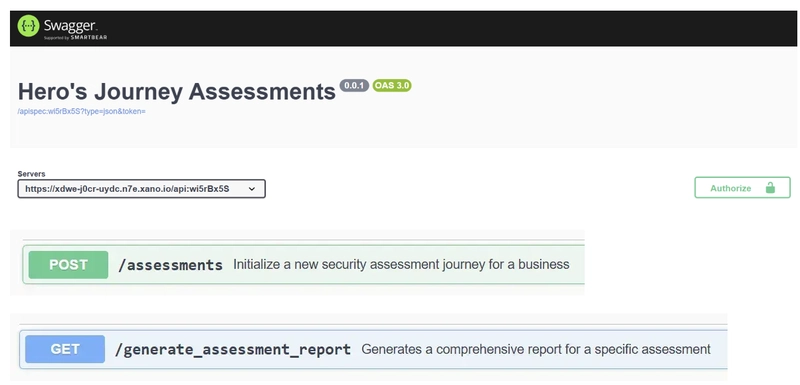
Rate Limits: Managed by Xano’s platform infrastructure. Authentication: Disabled for demo; production deployment would enable JWT auth via Xano’s built-in user authentication.
Key Endpoints
Start a New Journey
POST /assessments
Content-Type: application/json

{
  "business_name": "Acme Retail",
  "vertical": "retail",
  "employee_count": 25
}
Response:
{
  "business_id": 1,
  "assessment_id": 1,
  "stages": [
    {"stage_name": "call_to_adventure", "score": 0},
    {"stage_name": "crossing_the_threshold", "score": 0},
    {"stage_name": "tests_allies_enemies", "score": 0},
    {"stage_name": "the_ordeal", "score": 0},
    {"stage_name": "return_with_elixir", "score": 0}
  ]
}
Generate Narrative Report
GET /generate_assessment_report?assessment_id=1
Response:
{
  "business": {
    "name": "Acme Retail",
    "vertical": "retail",
    "employee_count": 25
  },
  "narrative_summary": {
    "hero_name": "Acme Retail",
    "current_chapter": "call_to_adventure",
    "stages_completed": 1,
    "overall_score": 75,
    "journey_status": "Apprentice"
  },
  "journey_stages": [...],
  "report_generated_at": 1765346205738
}
Journey Status Thresholds:
- Novice—Just beginning (score < 20)
- Apprentice—Making progress (score 20–49)
- Guardian—Strong foundation (score 50–79)
- Hero—Security champion (score 80+)
Demo
Live API: https://xdwe-j0cr-uydc.n7e.xano.io/api:wi5rBx5S
Test it yourself:
- Create a new journey with
POST /assessments - Update stage scores with
PATCH /journey_stage/{id} - Generate your narrative report with
GET /generate_assessment_report
The AI Prompts I Used
For the Journey Begin Endpoint:
Create an API that:

1. Accepts inputs: business_name (text), vertical (text), employee_count (integer)

2. Creates a new business record with those values

3. Creates a new assessment record linked to that business with:
   - current_stage: "call_to_adventure"
   - status: "in_progress"
   - started_at: current timestamp

4. Creates 5 journey_stage records for this assessment:
   - "call_to_adventure" (score: 0)
   - "crossing_the_threshold" (score: 0)
   - "tests_allies_enemies" (score: 0)
   - "the_ordeal" (score: 0)
   - "return_with_elixir" (score: 0)

5. Returns the assessment ID, business ID, and list of journey stages created
For the Report Generator Endpoint:
Create an API that:

1. Takes assessment_id from the URL path parameter
2. Fetches the assessment record to verify it exists
3. Fetches the business record linked to this assessment
4. Fetches all journey_stage records for this assessment
5. Calculates overall progress:
   - Count stages with score > 0 as "completed"
   - Calculate average score across all stages
6. Generates a narrative summary object with:
   - hero_name: the business name
   - current_chapter: the current_stage from assessment
   - stages_completed: count of stages with score > 0
   - overall_score: average of all stage scores
   - journey_status: "beginning" if avg < 20, "progressing" if avg < 60, "mastering" if avg >= 60
7. Returns business info, assessment info, all journey stages, the narrative summary, and timestamp
How I Refined the AI-Generated Code
Initial AI Output
The Xano Logic Assistant generated a solid foundation:
- Database schema with proper relationships (business → assessment → journey_stages)
- CRUD endpoints for all tables
- Basic function stacks for custom logic
Human Refinements
1. Authentication Configuration
The AI defaulted to authenticated endpoints. I changed critical endpoints to Public for the demo while keeping the architecture ready for production auth.
2. Error Handling
Added preconditions to validate that assessments and businesses exist before processing:
precondition ($assessment != null) {
  error_type = "not_found"
  error = "Assessment not found."
}
3. Narrative Logic
The AI initially used pipe filters ($stage.score|default:0) that caused syntax errors. Simplified to conditional checks:
conditional {
  if ($stage.score > 0) {
    var.update $stages_completed_count {
      value = $stages_completed_count + 1
    }
  }
}
4. Journey Status Thresholds
Refined the status labels from generic (“beginning/progressing/mastering”) to narrative-appropriate (“Novice/Apprentice/Guardian/Hero”).
5. Maintainability by Design
Journey stages are database records, not hardcoded. New stages can be added without code changes—simply insert records. Scoring thresholds and status labels are configurable variables, making the framework extensible and adaptable.
My Experience with Xano
What Worked Well
Logic Assistant saved hours by generating functional code from plain English descriptions. Multi-step workflows that would take significant manual configuration were up and running in minutes.
The visual function stack made debugging intuitive. Seeing the flow from Inputs → Database Operations → Variables → Response helped me spot issues quickly.
Publishing workflow was safe and efficient. Draft → Test → Publish with diff view made it easy to iterate without breaking production endpoints.
Challenges
Syntax learning curve. XanoScript pipe filters (|default:0, |count) caused errors. The debug view helped identify issues, but clearer error messages would help newcomers.
Free tier limitations. Had to upgrade to Starter to unlock full functionality—the promo code from the challenge made this painless.
Performance Evidence
Response times remain consistently under 100ms with Xano’s managed Postgres backend:
-
POST /assessments: 0.05s -
GET /generate_assessment_report: 0.06s (28 statements)
This demonstrates production-ready scalability even with multi-step logic stacks.
Bottom Line
Xano let me build a production-ready API with complex business logic in under 4 hours. The AI didn’t write perfect code, but it got me 80% there—and the visual tools made the remaining 20% straightforward.
Why This Matters
Small businesses are the backbone of the economy and increasingly targets of cyberattacks. Enterprise security frameworks don’t translate to a 10-person company. The Hero’s Journey framework makes security accessible by speaking the language of story rather than compliance.
This API is the backend for a larger vision: security assessments that feel like guidance, not judgment.
Built with Xano for the AI-Powered Backend Challenge. View the full API documentation.