
🚀 Best Free & Open Source Flutter Admin Dashboard Template for 2026

Building Admin Dashboards, CRMs, and Internal Tools in Flutter Web is powerful, but handling complex data presentation can be a nightmare.
Developers often struggle with:
- Creating responsive Data Tables that look good on desktop and Tablet.
- Handling Server-side Pagination, sorting, and filtering without boilerplate.
- Building consistent List Views for data that doesn’t fit a table format.
Enter te_widgets – a library specifically crafted to solve the data presentation challenge for Flutter Web Admin Panels.
📊 1. Advanced Data Tables (TDataTable)
Stop rebuilding the same table logic for every module.
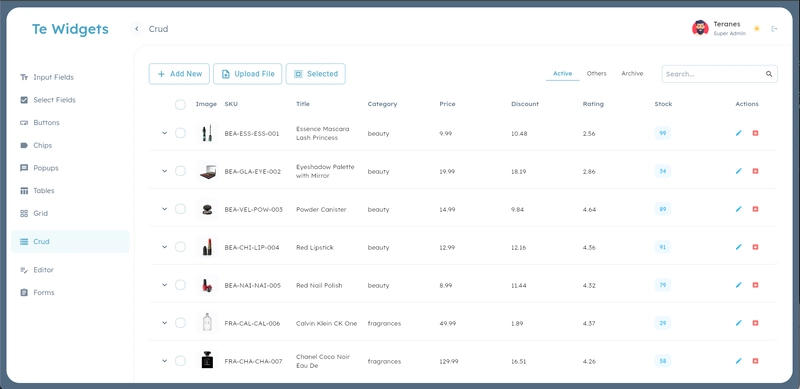
- Server-Side Ready: Built-in callbacks for loading data, handling page changes, and search queries.
- Rich Columns: Easily render Text, Chips, Status indicators, or Action buttons.
- Expandable Rows: Show detailed information without navigating away.
- Sticky Headers/Footers: improving UX on long lists.
📝 2. Intelligent List Views (TList)
Not every data set belongs in a grid.
- Flexible Rendering: Perfect for card-based layouts or mobile-responsive views.
- Unified Controller: Share the same
TListControllerlogic between your Tables and Lists. Switch between Table view (Desktop) and Card view (Mobile) seamlessly.
🔗 Try it Live
Check out the data tables in action here:
👉 Live Demo & Docs
✨ More Than Just Tables
To build a complete admin panel, you need more than just tables. We’ve got you covered:
- 🖥️ Responsive App Shell:
TLayoutgives you a professional sidebar navigation that adapts to screen size (Drawer / Rail / Extended). - 📝 Enterprise Forms:
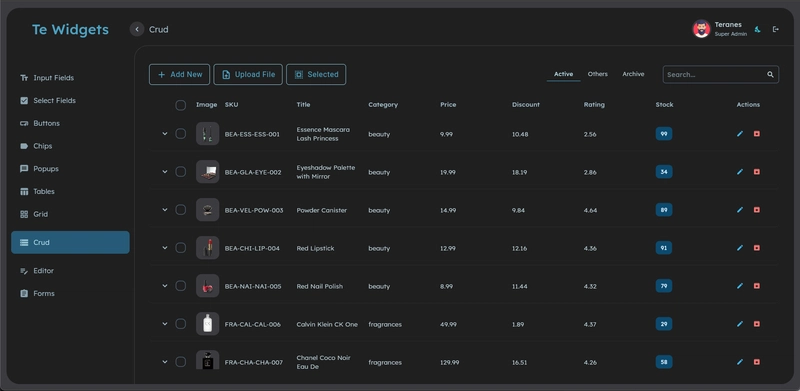
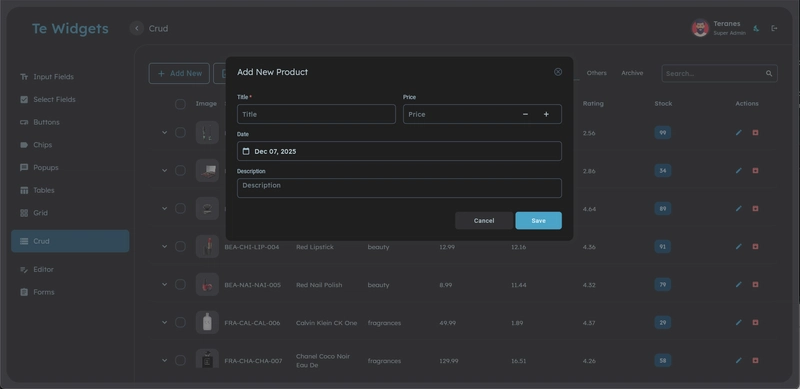
TFormBuilder,TTextField,TTagsField, andTSelectare designed for density and speed. - 🎨 Theming: A unified design system that looks professional out of the box (Light & Dark modes).
📸 See the Difference
Rich Data Tables with Actions & Status:
Responsive Layouts for Admin Panels:
Clean Forms for Data Entry:
🛠️ Quick Integration
Add it to your pubspec.yaml:
dependencies:
  te_widgets: ^2.0.5
Create your first Data Table:
TDataTable<User, int>(
  headers: [
    TTableHeader.text('ID', (user) => user.id),
    TTableHeader.text('Name', (user) => user.name),
    TTableHeader.chip('Role',
      (user) => user.role,
      color: (user) => user.isAdmin ? Colors.red : Colors.blue,
    ),
  ],
  onLoad: (options) async {
    // Automatic handling of pagination params!
    return await api.getUsers(
      page: options.page,
      limit: options.itemsPerPage
    );
  },
)
🔗 Resources
- Pub.dev: te_widgets
- GitHub: teranes10/flutter-libs
